
Getting a voice memo transcribed is simple: just move the audio file from your phone to a transcription service. That’s it. In a few clicks, your spoken ideas become searchable, editable text, making them instantly more useful. It's a small bit of effort that unlocks a massive amount of potential hiding in your recordings.
Why Transcribing Voice Memos Is a Productivity Superpower
We've all been there. A brilliant idea strikes while you're walking the dog or stuck in traffic. You grab your phone, record a quick voice memo, and then… it vanishes into a forgotten folder, lost in a sea of identical-looking audio files.
Learning how to transcribe voice memos changes this entire dynamic. It’s not just about converting audio to text; it's a strategic move that turns those fleeting thoughts into tangible assets.
When you convert your audio into text, you're creating a searchable archive of your own brain. Suddenly, that genius brainstorm from last Tuesday is no longer a lost recording but a document you can pull up with a simple keyword search. This is what makes voice memo transcription so powerful.
From Spoken Words to Actionable Insights
For anyone doing creative or strategic work, this is an absolute game-changer. Just think about these real-world scenarios:
- A journalist dictates an article draft on the go and has a written version waiting for them back at the desk.
- A project manager records a quick summary after a meeting and instantly has a list of action items to share with the team.
- A content creator uses a single voice memo transcription to create a script, a dozen social media posts, and a full-length blog article.
This process is a cornerstone of improving workflow efficiency, because it completely removes the need to manually type out every single thought. Instead of scrubbing through hours of audio, you can scan a document in seconds to find exactly what you need.
The image below shows the familiar interface of a voice memo app—the starting point for this whole process.
This simple tool becomes incredibly powerful once you start transcribing its contents. It goes from being a basic recorder to a source of structured, valuable information.
"The real magic happens when you stop seeing voice memos as just audio files and start seeing them as the first draft of your next big project. Transcription is the bridge that gets you there."
The demand for this isn't just a hunch; it's a huge, growing market. The general transcription services market is on track to blow past USD 32 billion by 2025. This growth is driven by one simple need: turning recorded audio into text you can actually use.
You can read more about this trend in the general transcription services market in this report. It highlights a major shift—businesses and individuals are finally realizing the immense value that's been locked away inside their audio recordings.
A Practical Guide to Transcribing Your Voice Memos
Turning those fleeting audio notes into organized, searchable text is a lot easier than you might think. Whether you're capturing ideas on the go with your phone or working with recordings at your desk, the path to a clean transcript is incredibly straightforward.
This guide will walk you through the practical steps—no jargon, just a clear path to get your audio file from your device and into a tool like Meowtxt. The basic idea is simple: record your thoughts, send the file for transcription, and get a text document you can actually work with.
This is what that simple flow looks like in practice:
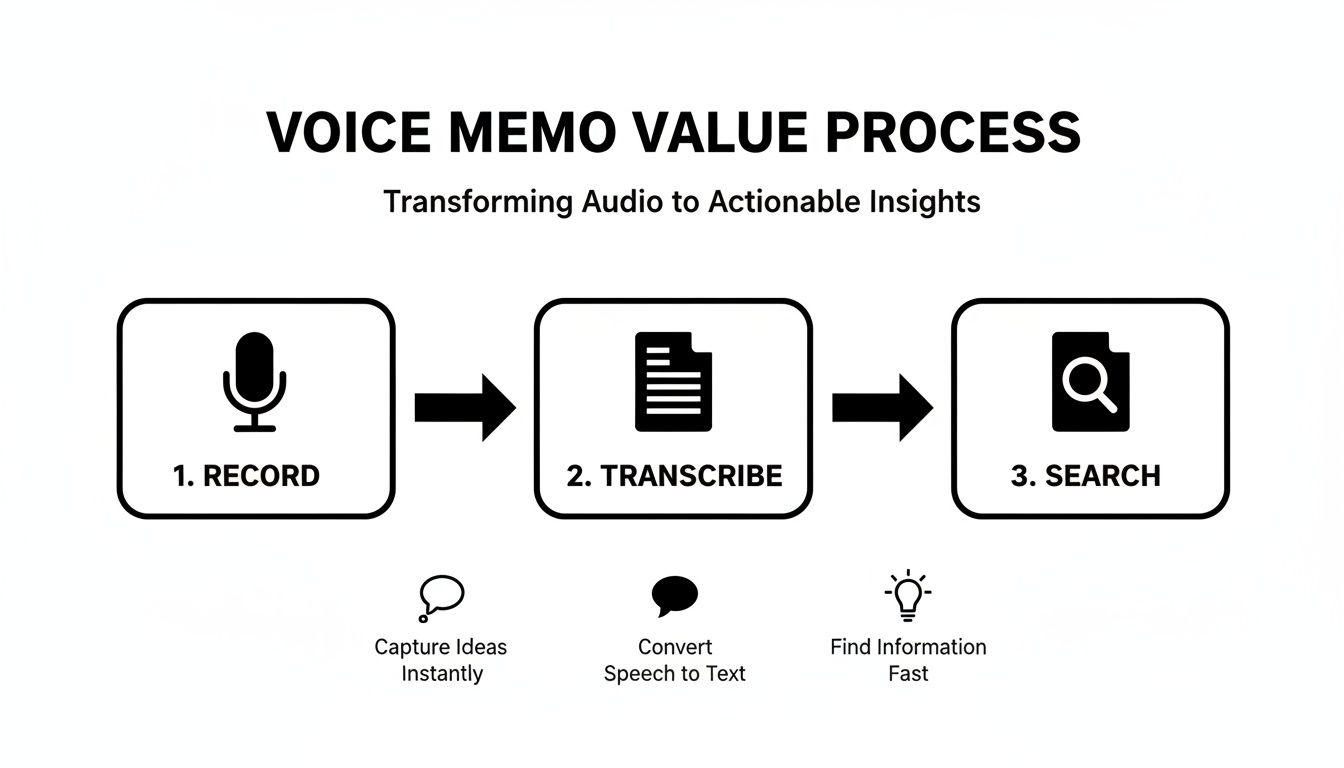
You’re not just getting a transcript; you're turning a passive audio file into an active asset you can search, edit, and share in seconds.
Transcribing Directly From Your Phone
Let's face it, most of us are recording voice memos on our phones. That makes mobile transcription the most common—and often the fastest—workflow. The beauty of modern apps is that you can send an audio file directly from your recording app to a transcription service with just a couple of taps.
For iPhone users, the process is especially seamless. We have a detailed guide on how to transcribe voice memos on an iPhone, but the core steps are pretty much universal.
Here’s the typical mobile workflow:
- Open your recording app (like Voice Memos on iOS or a recorder on Android).
- Pick the recording you want to turn into text.
- Find the "Share" or "Export" button. It’s usually an icon with an arrow pointing out of a box.
- From the share menu, choose your web browser (like Chrome or Safari) or the transcription app itself. This will pop open the service, ready for your file.
This direct-to-browser method is incredibly efficient. It completely skips the clumsy steps of saving the file, digging through folders to find it, and then manually uploading it. You’re essentially sending it straight from its source to the finish line.
Moving Voice Memos From Your Computer
Sometimes your audio files are already on your desktop, especially if you're a podcaster or you're working with much longer recordings. Getting these files transcribed is just as simple.
Depending on your setup, you've got a few great options:
- Cloud Sync: If you use iCloud, Google Drive, or Dropbox, your voice memos might already be synced to your computer. Just find the file in your cloud folder and drag it right into your transcription tool.
- AirDrop (for Apple users): This is easily one of the fastest ways to zap a file from an iPhone to a Mac. AirDrop the voice memo, and it’ll land in your Downloads folder, ready to go.
- Email or Messaging: For smaller files, the classic move of emailing or messaging the file to yourself still works perfectly. It’s a reliable way to get audio from your phone to your computer in a pinch.
Whether you're working from your phone or your computer, the workflow can be slightly different, but the end goal is the same.
Here's a quick look at how the steps compare.
| Step | Mobile (iPhone/Android) | Desktop (Mac/PC) |
|---|---|---|
| Locate File | In your phone's voice recording app. | In a local folder, cloud drive, or downloads. |
| Initiate Transfer | Use the "Share" or "Export" function. | Open a web browser and navigate to the tool. |
| Upload | Send directly to the browser/app from the share menu. | Drag and drop the file from the folder into the browser. |
| Process | Transcription starts automatically. | Transcription starts automatically. |
As you can see, both paths are quick and get you to the same place: a ready-to-use transcript.
The technology behind these instant conversions is booming. The AI transcription market was valued at around USD 4.5 billion and is expected to hit USD 19.2 billion by 2034. This explosive growth shows just how essential—and accurate—these automated systems are becoming for everyday tasks.
The goal is to make the jump from audio to text feel invisible. You shouldn’t have to wrestle with file formats or clunky uploads—it should just work. The best tools understand this and build their entire experience around that simplicity.
No matter which device you use, the principle is the same. Get the file, upload it to a service like Meowtxt, and let the software do the heavy lifting. In moments, your spoken words become a powerful, usable text document.
How to Get Crystal Clear Transcription Accuracy
When you transcribe a voice memo, the final text is only as good as the original audio. I've seen it time and time again: poor quality recordings are the #1 cause of transcription errors, leading to jumbled sentences and missed words. But the good news is you don't need fancy studio equipment to get it right. A few simple habits can make a massive difference.
Think of it this way: the transcription software is listening intently to your recording. If it has to strain to hear you over a noisy cafe or decipher mumbled words, it’s going to make mistakes. Your job is to give it the cleanest possible signal to work with.
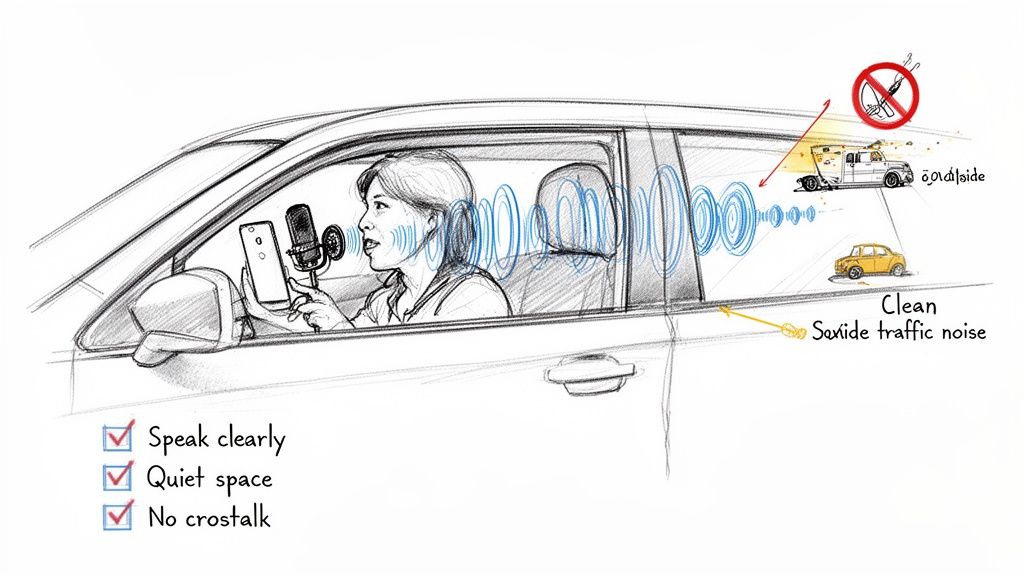
Optimize Your Recording Environment
First things first: control your surroundings. Background noise is the enemy of accurate transcription. AI models can really struggle to separate your voice from ambient sounds like traffic, music, or other conversations.
Before you hit record, find a quiet space. This could be an empty office, a bedroom, or even your closet—the soft materials are surprisingly great for absorbing echo.
Pro Tip: If you're in a pinch and need to record on the go, a parked car can act as a surprisingly effective sound booth. It isolates you from street noise and the interior dampens reverb, giving you a much cleaner recording.
Get the Mic Placement Right
Your phone's built-in microphone is more powerful than you probably think, but it works best when it's close to the source. Don't record with your phone buried in your pocket or sitting across the room. It just won't work well.
Hold it a few inches from your mouth, just like you would on a phone call. This simple adjustment ensures your voice is the most prominent sound in the recording, dramatically improving what's known as the signal-to-noise ratio. Speaking clearly and at a consistent volume also helps the software lock onto your words.
Avoid These Common Audio Pitfalls
Even with a good setup, a few common mistakes can ruin an otherwise perfect recording. Being mindful of them is half the battle.
Here are a few things to watch out for:
- Crosstalk: When multiple people speak at once, it creates an audio mess that's nearly impossible for even the most advanced AI to untangle. If you're recording a meeting, encourage participants to speak one at a time. It makes a world of difference.
- Echo and Reverb: Large, empty rooms with hard surfaces (like kitchens or boardrooms with bare walls) cause your voice to bounce around. This echo can make your words sound muddy and indistinct to the software.
- Wind Noise: Recording outside? Even a slight breeze can overwhelm the microphone. Try to find a sheltered spot or cup your hand around the phone to block the wind.
After you've captured great audio, the next step is ensuring the final text is flawless. Even the best transcripts benefit from a quick human review. You can explore some essential techniques in our guide to proofreading in transcription to catch any minor errors the AI might have missed.
So, What Can You Actually Do With That Transcript?
Once you’ve transcribed a voice memo, you're holding more than just a simple text file. That file is the starting point, the raw ingredient for a ton of other valuable content. The transcript itself isn't the final product; it's the key to streamlining your work and making your spoken ideas so much more accessible.
Think of it like this: a podcaster records a quick voice memo outlining an episode. That single recording, once transcribed, can become the foundation for a detailed blog post, a complete set of show notes, and even a week’s worth of social media clips. The one-time effort of transcription pays you back over and over.
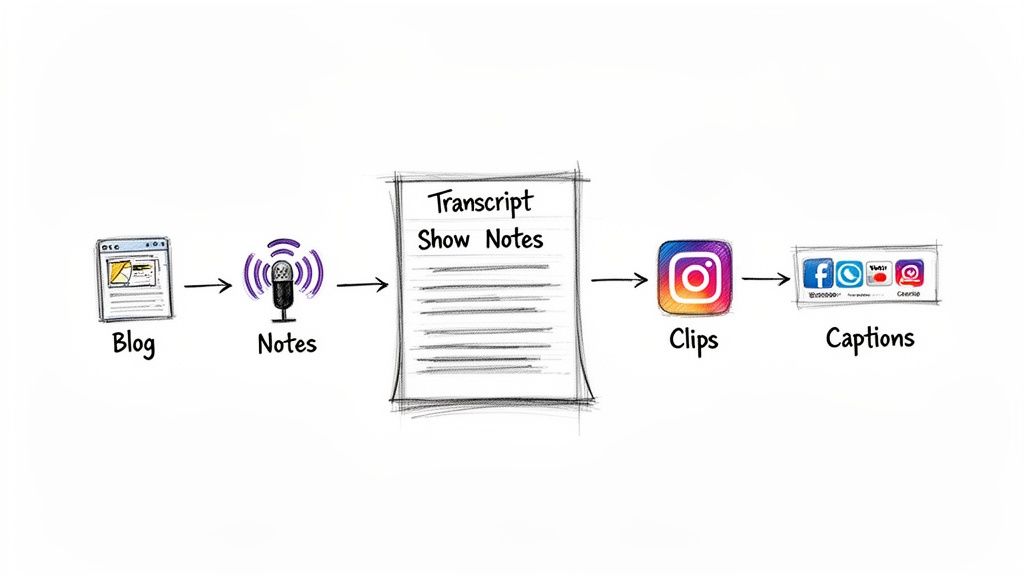
This move from audio to text is also what’s fueling massive market growth. The entire voice-and-speech-recognition market was valued at around USD 14.8 billion, but it's on track to hit USD 61.27 billion by 2033. That explosive growth shows just how much demand there is for turning spoken words into useful, searchable text for everything from meeting notes to podcasts.
Turn Team Brainstorms into Actionable Plans
For any team, a transcribed brainstorming session is a goldmine. Instead of one person furiously typing notes while also trying to participate, you can just hit record and let a tool like Meowtxt do the heavy lifting.
With an accurate transcript in hand, you can immediately:
- Generate an AI summary to boil down the key decisions and takeaways in seconds.
- Pinpoint action items and assign them to the right people without anything slipping through the cracks.
- Create a searchable archive of the entire conversation, making it dead simple to find a specific comment weeks later.
This simple process ensures that those brilliant ideas from a high-energy meeting don’t just vanish into thin air. It creates instant accountability and clarity, turning a free-flowing chat into a concrete plan.
Kick Your Content Creation into Overdrive
If you’re a content creator—whether a YouTuber, podcaster, or blogger—you can build an entire production workflow from a single transcribed voice memo. A transcript is the multi-tool that unlocks dozens of content formats.
Once you have the text, you can instantly see the structure of your ideas. You can pull out the most powerful quotes for social media, identify sections that would make great video clips, and see the logical flow for a written article.
Video creators, for example, can export the transcript as an SRT file to create perfectly synced captions. This isn't just about accessibility; it also gives your SEO a serious boost since search engines can now "read" your video's content. Seeing real-world examples, like Mindstamp's introduction of searchable video transcripts, shows just how powerful this can be.
The Advanced Features That Really Matter
Modern transcription tools offer way more than just a wall of text. Features like speaker identification (sometimes called diarization) and timestamping are game-changers, adding layers of context that make the transcript infinitely more useful.
- Speaker Identification: This feature automatically labels who said what (e.g., "Speaker 1," "Speaker 2"). It’s absolutely essential for transcribing interviews or team meetings, making the conversation easy to follow.
- Timestamping: This links every word or phrase back to its precise moment in the audio. It’s a lifesaver for editing because you can just click a word in the text to jump straight to that spot in the recording and check it yourself.
These aren't just minor bells and whistles. They transform a flat text file into an interactive, organized document. By using them, you're not just transcribing a voice memo; you're creating a powerful asset that saves you time and opens up entirely new possibilities for your content and your team.
How We Handle Your Privacy and Security
Let's be honest. When you transcribe voice memos, you're often dealing with private material. It could be a confidential strategy session, a personal journal entry, or a client interview full of sensitive details. Handing that audio over to any online service should make you ask some tough questions about privacy. It's only natural.
So, how does a service actually protect your file the moment you upload it? The gold standard is something called encryption-at-rest. In simple terms, this means your audio file gets scrambled and securely stored on the service's servers, making it totally unreadable to anyone who isn't authorized.
Why Your Data Shouldn't Live Forever
Beyond that initial security blanket, the service's data retention policy is just as crucial. Think about it: once you have your transcript, is there really any good reason for your original audio file to sit on some company's server forever? For most of us, the answer is a hard no.
This is where a service like Meowtxt really shines. We automatically delete your files right after the transcription is complete, which is what's known as a "privacy-by-design" approach. It radically reduces any risk because your sensitive data simply doesn't hang around.
This auto-deletion feature is a huge win for anyone concerned about confidentiality. It guarantees that your private brainstorming sessions, client notes, or big ideas aren't just sitting on a server long after you've gotten the text you needed.
What to Look for in a Transcription Service
Choosing the right tool isn't just about speed or accuracy. You have to feel confident that your information is being handled with respect.
Here are a few key things to check for before you upload anything, anywhere:
- Clear Deletion Policies: Does the service say exactly when and how your files are deleted? Vague promises are a major red flag.
- Encryption Standards: Look for mentions of AES-256 or similar strong encryption methods for your data, both while it's uploading and while it's stored.
- Transparent Terms: A trustworthy service will have a privacy policy that's easy to read and tells you exactly what happens to your data.
Always take a moment to read the fine print. By prioritizing services that are upfront about their security and committed to storing your data for the shortest time possible, you can transcribe your voice memos with total peace of mind.
Got Questions About Voice Memo Transcription?
As you get started turning your voice memos into text, a few questions always seem to pop up. We’ve been there. So, we've gathered the most common ones here to give you quick, practical answers and clear up any confusion.
How Long Does a Transcription Actually Take?
It's surprisingly fast. With modern AI, the processing speed is often a tiny fraction of the recording time. Many services can chew through audio at up to 40 times the speed of the original recording.
What does that mean in the real world? A 10-minute voice memo packed with your best ideas can be fully transcribed and ready to review in well under a minute. The days of waiting hours (or days) are long gone. It’s a nearly instant process that fits right into your workflow without slowing you down.
Can I Transcribe Recordings with Multiple People Talking?
Yes, absolutely. This is a must-have for anyone recording meetings, interviews, or brainstorming sessions. Advanced tools handle this with a feature called speaker identification (or diarization).
This tech is designed to tell different voices apart. Your final transcript won't just be a wall of text. Instead, it’ll be neatly organized with labels like "Speaker 1" and "Speaker 2," making it easy to follow the conversation and see who said what.
The ability to distinguish between speakers is a game-changer for collaboration. It turns a chaotic group discussion into a structured, easy-to-read dialogue, ensuring no one's contributions get lost.
What's the Best Audio Format to Use?
While most services handle common formats like MP3 and M4A (the default for most phones) without any trouble, the file type isn't what truly matters for accuracy.
The real key to a great transcript is the clarity of the audio itself. A recording with clear speech and minimal background noise will always give you the best results, whether it’s a WAV, M4A, or MP3 file. The bottom line is to focus on recording quality first.
Is It Safe to Upload Confidential Memos?
It's safe, but only if you choose a service that takes security seriously. The most important feature to look for is encryption, which scrambles your files so no one else can access them during upload.
Even more critically, you should check the service's data retention policy. A platform like Meowtxt that automatically deletes your files shortly after processing offers a much higher level of privacy. This policy ensures your confidential information isn't just sitting on a server somewhere, giving you peace of mind.
Ready to turn your spoken ideas into actionable text? Meowtxt offers fast, accurate, and secure transcription for all your voice memos. Get your first 15 minutes transcribed for free at meowtxt.com and see how easy it is.


