
Need a text version of your MP3 file? The fastest way is to use an automated AI transcription service. These modern tools are remarkably simple: just upload your audio, and they convert mp3 to text in minutes, transforming spoken words into a fully editable document you can search, share, and repurpose.
Why Converting MP3 to Text Is a Content Game-Changer
Have you ever finished a fantastic podcast recording or an insightful interview, only to feel a wave of dread? You know the feeling. The fun part is over, and now the real work begins: manually typing out every word. It's a slow, tedious process that kills your creative momentum.
This is precisely where learning how to convert MP3 to text becomes more than a simple time-saver. It’s a strategic move that unlocks the full potential of your audio content.
Think about it. That one-hour MP3 file doesn't just have to be an audio file. Once transcribed, it becomes raw material for a detailed blog post, a dozen social media snippets, or a comprehensive set of show notes. It’s the ultimate work-smarter-not-harder strategy for content creators.
Maximize Your Content's Reach and Value
The biggest win when you convert MP3 to text is making your spoken words discoverable. Search engines can’t listen to your podcast, but they can easily crawl and index a text transcript. This simple action gives your audio a massive SEO boost, helping new audiences find your content organically.
But the benefits go far beyond visibility. A transcript opens up entirely new avenues for your work:
- Accessibility: A text version makes your content instantly accessible to people who are deaf or hard of hearing, meaningfully expanding your audience.
- Repurposing: Effortlessly pull killer quotes for social media, build in-depth articles, or craft email newsletters—all from one recording.
- Efficiency: For professionals, searchable meeting notes are a lifesaver. You can instantly find out who said what and pinpoint key decisions without scrubbing through an entire recording.
At its core, converting audio to text isn’t just about getting a script. It’s about transforming a one-dimensional piece of media into a versatile asset that can be endlessly reshaped, shared, and discovered.
The Growing Shift to Automation
This strategic shift toward leveraging every piece of audio is clearly reflected in the market’s explosive growth. The global transcription market was valued at roughly $21.01 billion in 2022 and is projected to hit $35.8 billion by 2032.
What's even more telling is that the AI transcription segment is expanding at a blistering 15.6% compound annual growth rate, showing a decisive shift away from old-school manual methods. You can discover more insights on automated transcription statistics and see how this tech is reshaping content workflows.
This data sends a clear signal: automated transcription isn’t just a fleeting trend. It's quickly becoming the standard for anyone serious about creating and managing content efficiently.
Choosing Your Transcription Method
When you need to turn an MP3 into text, you have a few different ways to approach it. There’s no single "best" option—the right choice hinges on what you need the transcript for. It's a balancing act between your budget, your deadline, and how perfect the final text needs to be.
The decision can feel a bit overwhelming, but it really comes down to your goals. Think about whether you're creating a blog post for SEO or just taking quick personal notes. This decision tree can help you visualize which path makes the most sense for your project.
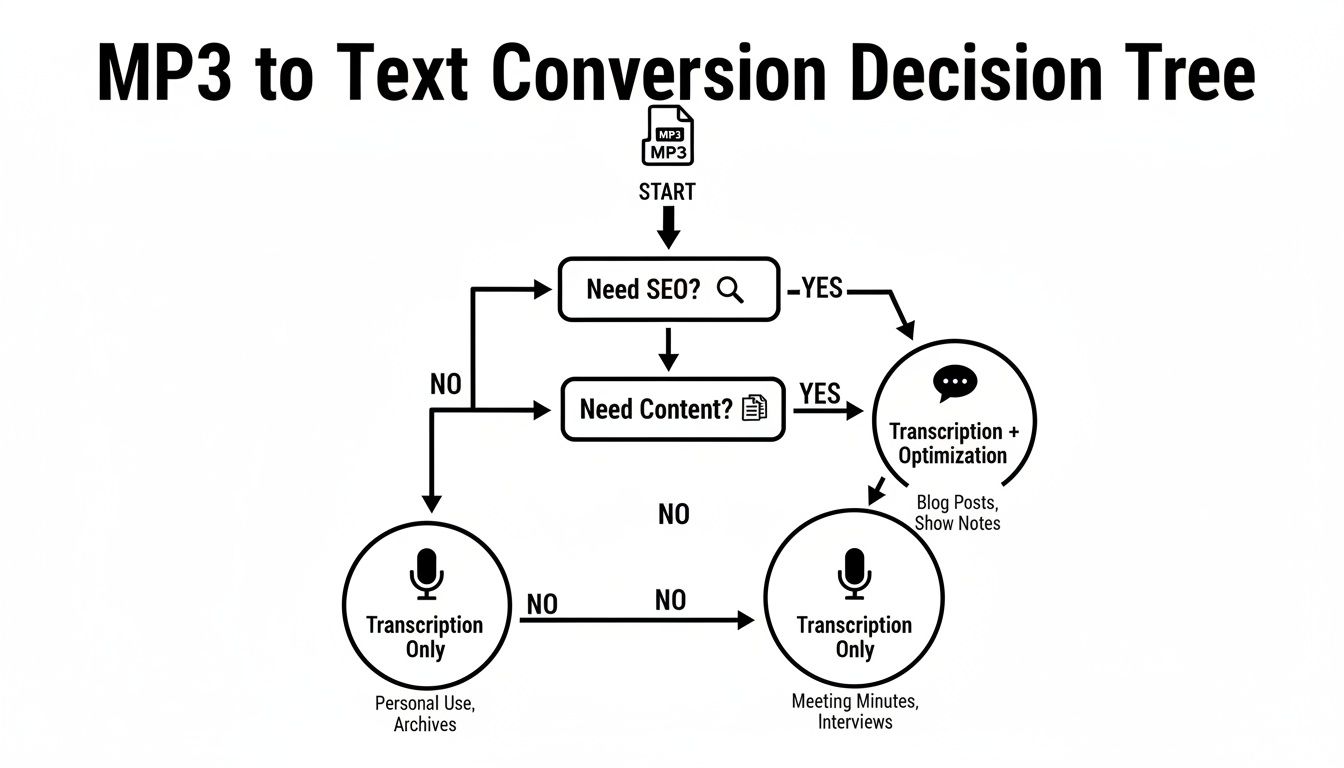
As the graphic shows, your end goal often points you in the right direction, steering you toward either raw speed for large projects or meticulous precision for mission-critical tasks.
Comparing MP3 to Text Conversion Methods
To make it even clearer, here’s a quick breakdown of the main ways you can convert MP3 to text, highlighting the key differences in speed, cost, and accuracy.
| Method | Best For | Typical Accuracy | Speed | Cost |
|---|---|---|---|---|
| Automated AI Services | Most general uses: interviews, lectures, content creation, meeting notes. | Up to 97.5% | Minutes | Low (Pay-as-you-go) |
| Manual Human Services | Legal, medical, or academic research; poor quality audio with heavy accents. | 99%+ | Hours to Days | High (Per-minute rate) |
| DIY / Built-in Tools | Very short, informal notes where accuracy isn't a major concern. | Highly variable | Real-time (slow) | Free |
Ultimately, the choice between these methods hinges on what you value most: the speed and affordability of AI, the flawless accuracy of a human, or the no-cost approach of DIY for tiny tasks.
Automated AI Transcription Services
For most people, most of the time, automated AI services are the best way to convert MP3 to text. It’s the modern standard for a reason. Tools like Meowtxt use incredibly sophisticated algorithms to process audio files, often transcribing an entire hour in just a few minutes. This is where the industry is moving, and fast.
The market for this tech is exploding. The global speech-to-text API market was valued at a massive $2.2 billion in 2021 and is on track to hit $5.4 billion by 2026. That explosive 19.2% compound annual growth rate signals just how much demand there is for this kind of instant, automated transcription. Read the full research about speech-to-text market growth.
The real win with AI is that you get an amazing blend of speed, affordability, and surprisingly high accuracy. With a clear recording, you can easily hit up to 97.5% accuracy, which is more than good enough for blog posts, meeting notes, or video captions.
Manual Human Transcription
Sometimes, though, you just need a person. If your MP3 file is a mess—think heavy background noise, thick accents, or people talking over each other—a professional human transcriber is your best bet. They can understand context, slang, and mumbled words in a way that AI still can't quite manage.
But that human touch comes at a price. Manual transcription is far slower, often taking hours or even days to get back. It's also significantly more expensive than an AI service. This is the right call for things like legal depositions, official medical records, or academic research where every single word must be perfect, no exceptions.
DIY with Built-in Tools
For a super short, simple recording, you might be tempted to just use the dictation tool that comes with your computer. The idea is to play the MP3 out loud and let your device's built-in voice-to-text feature "listen" and type it out.
While it’s technically free, this method is usually the least accurate and most frustrating. You need a dead-silent room, and you'll spend a ton of time manually fixing errors. It’s just not practical for anything longer than a minute or two. To get a better sense of your options, you can dig into the different types of audio to text transcription software and see which one really fits your workflow.
Your Workflow for Using an AI Transcription Service
Alright, let's get practical. I’ll walk you through the exact process to convert MP3 to text using a modern AI service like Meowtxt. It’s far simpler than you might think, and once you get the hang of it, you can convert hours of audio into a polished document in minutes.
The whole idea is to get your file into the system, let the AI do the heavy lifting, and then spend a few moments cleaning up the output. This is the key to turning long recordings into valuable content without getting stuck typing for hours.
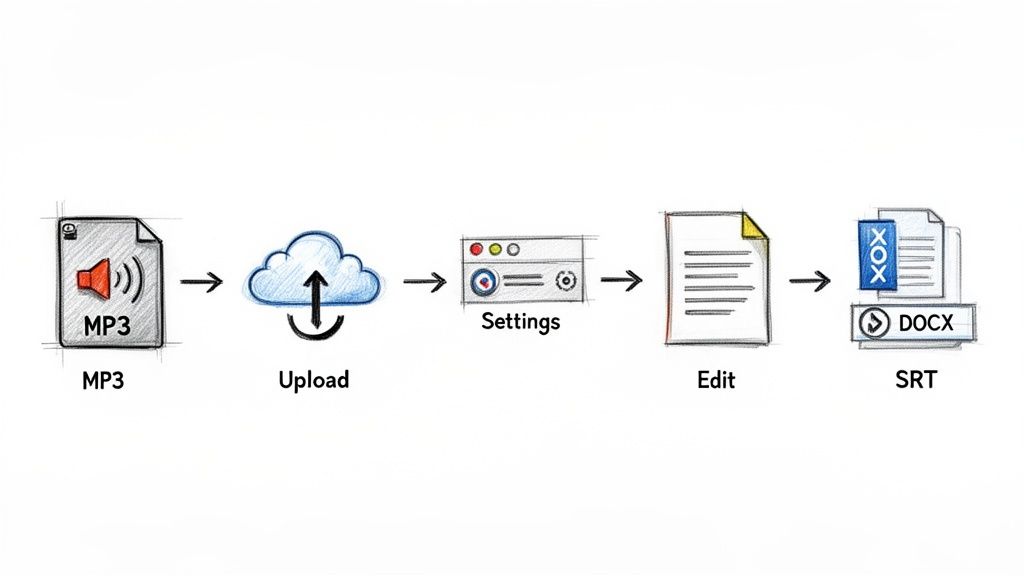
As you can see, the interface is clean and gets straight to the point, removing any guesswork. Now, let’s break down each part of this process.
Preparing Your Audio File
Before you upload anything, a little prep work can make a huge difference in your transcript's accuracy. Think of it as setting the AI up for success. You don't need to be an audio engineer; just a couple of quick checks will do.
First, if your MP3 has long, dead-air silences at the beginning or end, trim them. This saves processing time and keeps the final transcript focused on the actual conversation.
Also, double-check that the file is in a common format like MP3 or WAV. While many services accept a range of file types, sticking to the standards is the safest bet to avoid any compatibility issues. It’s a simple step that prevents upload errors and gets things moving faster.
Uploading and Configuring the Settings
Once your file is ready, it’s time to upload it to the transcription service. Most platforms, including Meowtxt, use a simple drag-and-drop interface. Just grab the MP3 file from your computer and drop it right into the upload box.
After it uploads, you’ll be presented with a few crucial settings. These are your main controls for guiding the AI.
- Language Selection: This is the most important setting, period. Make sure you select the correct language spoken in the audio. Getting this right can be the difference between a 97% accurate transcript and a document full of nonsense.
- Speaker Identification (Diarization): If your MP3 has multiple people speaking, like in an interview or a team meeting, you'll want to enable this. The AI will automatically detect who is speaking and label them (e.g., "Speaker 1," "Speaker 2"). This saves an incredible amount of manual work later on.
- AI Summary: Some tools give you the option to generate a summary alongside the full transcript. This is fantastic for pulling key takeaways and action items out of a long recording without having to re-read the whole thing.
Taking ten seconds to get these initial settings right will save you ten minutes of editing on the back end. It's your best opportunity to steer the AI's output from the very beginning.
Editing and Polishing Your Transcript
Once the AI is done—which often takes just a few minutes—you’ll get an interactive transcript. This isn't just a boring block of text. It's an editable document synced directly to your audio. You can click on any word and instantly hear the corresponding audio, which makes finding and fixing mistakes a breeze.
This is where you'll make a few final touches. You can quickly correct any misspelled names or jargon the AI might not have recognized. If you turned on speaker identification, now’s the time to replace "Speaker 1" and "Speaker 2" with the actual names of the people who were talking.
As you integrate AI into your workflow, it's also worth noting how many AI video editing software tools now offer this kind of feature built-in, streamlining the process even more for video creators.
Exporting Your Final Text File
With your transcript polished and ready, the last step is to export it in a format you can actually use. Most services provide several options, each tailored for a different job:
- DOCX: The perfect choice for turning the transcript into a blog post, article, or report in Microsoft Word.
- TXT: A simple, plain-text file that's ideal for quick notes or pasting into other apps.
- SRT: This format includes timestamps and is the industry standard for creating captions for platforms like YouTube.
Choosing the right export format means your new text file is ready for action immediately, completing the journey from spoken word to usable content.
How to Get a Near-Perfect Transcript Every Time
Let’s be honest. Even the smartest AI transcription tool is only as good as the audio you feed it. Think of it this way: if you can’t make out what someone is saying in a recording, the AI is going to struggle, too. Garbage in, garbage out.
The great news? You don't need a professional recording studio to get incredible results. A few small, intentional tweaks to how you record can skyrocket your transcription accuracy from "pretty good" to nearly flawless. This saves you a massive amount of editing time.
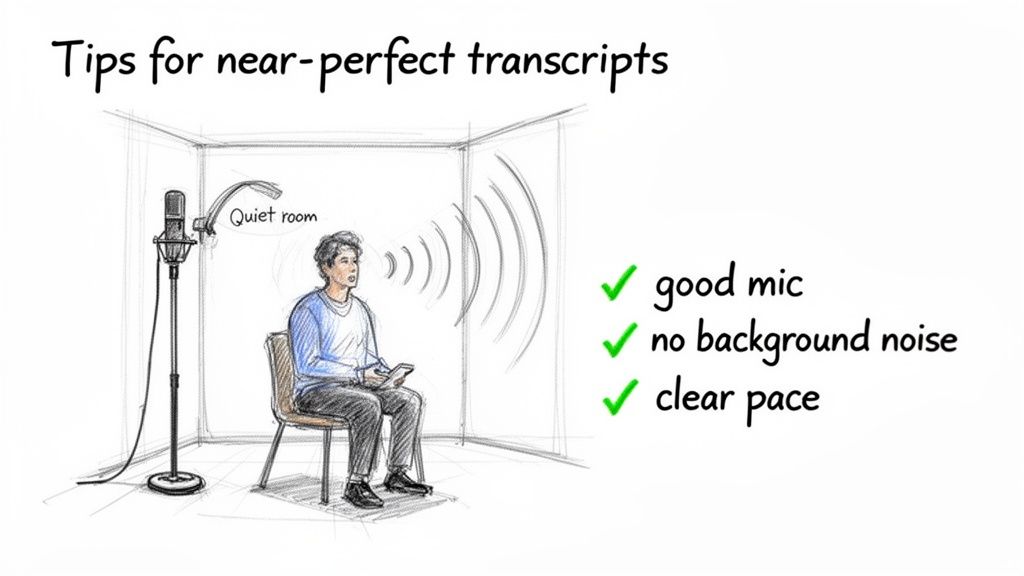
These simple adjustments are your best defense against common transcription errors, giving the AI the cleanest possible source material to work with.
Control Your Recording Environment
Your first move—and the one with the biggest impact—is to manage your surroundings. Background noise is the number one enemy of a clean transcript. Things like a humming air conditioner, passing traffic, or even a big, echoey room can litter your transcript with errors you'll have to fix by hand.
Here's what to focus on:
- Find a Quiet Spot: A small office with the door shut is miles better than an open-plan living room. Rooms with soft surfaces like carpet, curtains, or couches are your friend—they absorb sound and kill echo.
- Silence Everything: Before you hit record, put your phone on silent. Turn off computer notifications. That one little ping from an email can be enough to mangle an entire sentence in the transcript.
It's not about achieving absolute silence. It's about minimizing the audio clutter the AI has to fight through to accurately convert MP3 to text.
The cleaner the audio input, the cleaner the text output. Every minute you spend improving your recording environment can save you five minutes of tedious proofreading and editing later. For more on this final step, you can explore our detailed guide on effective proofreading in transcription.
Get the Right Gear and Positioning
You don't need to break the bank on gear, but stepping up from your laptop's built-in mic makes a world of difference. Even an affordable USB microphone or a simple lavalier (lapel) mic can make vocals dramatically crisper.
Mic placement is just as important. Position the microphone a consistent distance from whoever is talking—six to twelve inches is usually the sweet spot. This gives you a strong, steady audio signal without picking up distracting mouth sounds or having the volume jump all over the place. If you've got multiple people, give each person their own microphone if possible. It prevents that distant, muddled sound that kills accuracy.
Speak Clearly and Avoid Crosstalk
Finally, the way people speak during the recording is a huge factor. The AI is listening for clear, distinct phonetic patterns. When people talk over one another (crosstalk), it becomes nearly impossible for the software to separate who said what.
Encourage everyone on the recording to:
- Speak at a natural, even pace.
- Enunciate their words clearly.
- Most importantly, take turns and try not to interrupt.
These simple rules of recording etiquette are vital when you need to convert mp3 to text with high accuracy, especially for interviews, meetings, or focus groups.
Putting Your New Text File to Work
Getting your audio converted to text is a fantastic starting point, but let’s be honest—it’s just the beginning. The real magic happens in what you do next. Think of your new transcript not as a simple record of words, but as a versatile asset you can chop up, analyze, and share in a dozen different ways.
For content creators, this is where a single piece of work explodes into many. An hour-long podcast interview can suddenly become the backbone of an entire week’s worth of content. The full transcript can be polished into a pillar blog post, which immediately helps your SEO by making your spoken words searchable on Google. From there, you can cherry-pick the best quotes and turn them into eye-catching social media graphics or short video clips.
Instantly Repurpose Your Audio Content
The most powerful benefit here is turning one piece of content into many. This isn't just about saving time; it’s about meeting different parts of your audience where they are, on the platforms they actually use.
- Pillar Blog Posts: Clean up the text, add some headings, and you’ve got an in-depth article that captures every bit of value from your original conversation.
- Email Newsletters: Pull out the most compelling story or a few key takeaways to build an engaging newsletter that drives people back to your original audio.
- Social Media Gold: Find the punchiest quotes, surprising stats, or actionable tips. These are perfect for text posts, quote cards, or even scripts for quick TikToks and Reels.
When you start seeing your transcript as raw material, you shift from a "one-and-done" mindset to building a sustainable content engine. You did the hard part—recording the audio. Now you're just squeezing every last drop of value out of it.
This strategy is the core of smart content creation. If you want to dive deeper into getting the most out of every recording, our guide on effective content repurposing strategies is packed with more ideas.
Streamline Your Team and Research Workflows
The usefulness of a text file goes way beyond marketing. For business teams, a meeting transcript becomes the official source of truth for decisions and deadlines. Many modern services can even generate an AI summary, boiling a 60-minute call down to a few key bullet points and action items. No more "who was supposed to do that?" conversations.
Researchers and journalists get a massive win here, too. Forget scrubbing through hours of audio trying to find that one perfect quote. With a text file, you can just hit Ctrl+F (or Cmd+F) and find it in seconds. This simple trick can shrink research time from hours down to minutes.
And once you convert mp3 to text, you open up entirely new creative doors. You could, for instance, feed that script into powerful AI video generator from text tools to bring your words to life in a completely new format.
Finally, there’s the huge benefit of accessibility. By exporting your transcript as an SRT file, you can add accurate closed captions to your videos with almost no effort. This makes your content inclusive for viewers who are deaf or hard of hearing and boosts comprehension for everyone else.
Common Questions About MP3 to Text Conversion
Getting ready to turn a pile of MP3s into text can bring up a few last-minute questions, even when the process seems simple. We've been there. Before you hit "upload," let's run through some of the most common things people wonder about.
Think of this as the quick chat you'd have with an expert to clear up any lingering doubts.
How Long Does This Actually Take?
This is usually the first question people ask, and the answer is one of the biggest reasons to switch to AI. A typical one-hour audio file—think a full podcast episode or a weekly team meeting—is usually fully transcribed in just five to ten minutes.
To put that in perspective, the industry standard for a skilled human transcriber is about four hours of typing for a single hour of audio. The speed of a good AI tool is a total game-changer, especially when you're on a deadline.
Just How Accurate is AI Transcription?
Accuracy is everything, right? Under good conditions—clear audio, not a lot of background noise, people not talking over each other—the top AI services can hit 97.5% accuracy. For most business, content, or academic work, that's more than good enough to get the job done.
But it's not magic. The accuracy can take a hit if the audio is messy. A few things can trip it up:
- Heavy Accents: Strong, regional accents can sometimes confuse the AI.
- Poor Audio Quality: If the sound is muffled, echoey, or the mic is too far away, expect more errors.
- Crosstalk: When several people jump in and talk at once, the software struggles to untangle who said what.
If your audio has any of these issues, just plan on spending a little extra time in the editor cleaning things up.
Is It Safe to Upload My Audio Files?
This is a big one, especially if you're dealing with sensitive interviews or confidential meetings. Reputable platforms take security very seriously. The key feature to look for is end-to-end encryption, which scrambles your data during upload and storage so no one else can access it.
Beyond that, the best tools have clear privacy policies and, crucially, give you the power to permanently delete your files from their servers once you're done. That's a must-have for making sure your private conversations stay private.
Can the AI Handle Multiple Speakers?
Absolutely. This is a standard feature called speaker identification (or "diarization" if you want the technical term). The AI is trained to tell different voices apart and will automatically label the dialogue for you (e.g., Speaker 1, Speaker 2).
Once the transcript is ready, you just pop into the editor and replace those generic labels with the actual names. It makes following a conversation in a meeting or interview incredibly easy.
Ready to turn your audio into searchable, editable text in minutes? Meowtxt offers fast, accurate, and secure transcription with a simple drag-and-drop interface. Try it for free and get your first 15 minutes transcribed on us.


