
Meetings are expensive, but poorly documented meetings cost even more in lost productivity and confusion. The right meeting minutes format isn't just about recording what happened; it's a strategic tool for driving action, ensuring accountability, and preserving crucial decisions. Yet, many teams get stuck with a single, inefficient template that doesn't fit the meeting's true purpose.
Whether you need a quick action list for a daily stand-up or a detailed record for a board meeting, the structure of your notes is critical. This guide provides a detailed look at 7 distinct meeting minutes format example templates, exploring the strategic advantages of each. We'll offer actionable tips on how to implement them effectively.
We will also explore how modern tools like audio transcription can supercharge these formats, turning a tedious administrative task into a powerful productivity driver. Stop guessing and start using a format designed for clarity and results.
1. The Cornell Note-Taking System for Meeting Minutes
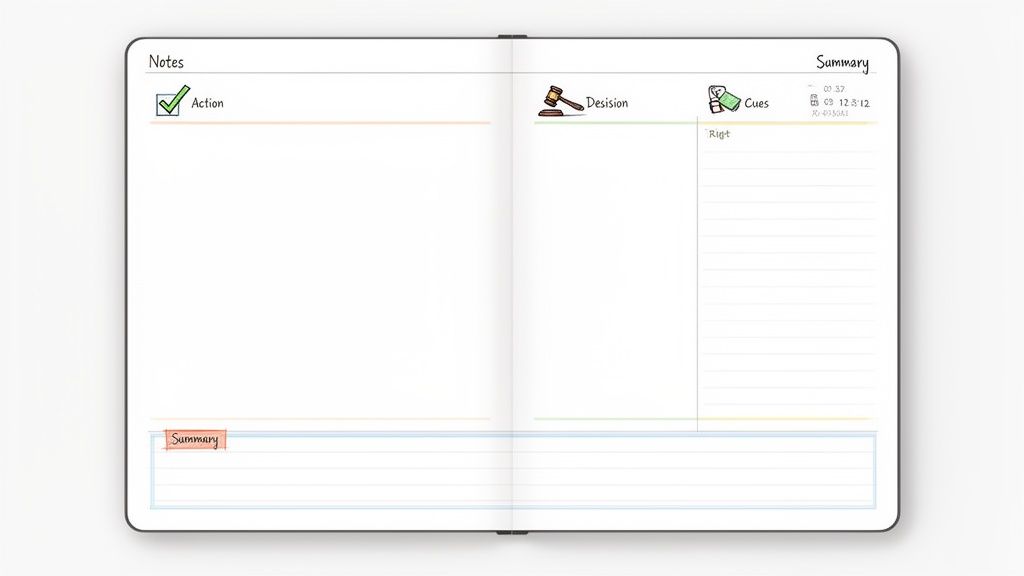
The Cornell Note-Taking System, developed by Cornell University professor Walter Pauk, is a highly structured method that works brilliantly as a meeting minutes format example. It divides your page into three specific sections: a large right-hand column for detailed notes, a narrower left-hand column for key topics or questions, and a summary section at the bottom. This layout creates an organized, easy-to-scan document that separates the raw discussion from the key takeaways.
This system becomes even more powerful when paired with transcription tools like Meowtxt, which can generate a complete record of the conversation. The note-taker can then use the transcript to fill the main notes column while populating the cues column with action items, decisions, and speaker names, creating a truly interactive record.
Why This Format Works
This method turns passive note-taking into an active process of synthesis. Instead of just writing down everything that’s said, you’re forced to identify the most critical information, like decisions and action items, and organize it in the cues column. Tech companies using this hybrid approach with Meowtxt have reported a 40% reduction in documentation time.
Actionable Tips for Implementation
- Use Cues for Action Items: Dedicate the left "cues" column to logging action items, who is responsible, and due dates for quick reference.
- Leverage Timestamps: If you're using a transcription service, add timestamps from the recording in the cues column next to key decisions. This makes it easy to find the exact discussion point later.
- Write the Summary Last: Fill out the bottom summary section right after the meeting. This forces you to review and synthesize the key outcomes, creating a perfect executive summary.
This meeting minutes format example is ideal for complex discussions where it's crucial to track decisions and assigned tasks clearly, making it a favorite in project management and legal settings.
2. The Action Item-Focused Meeting Minutes Template
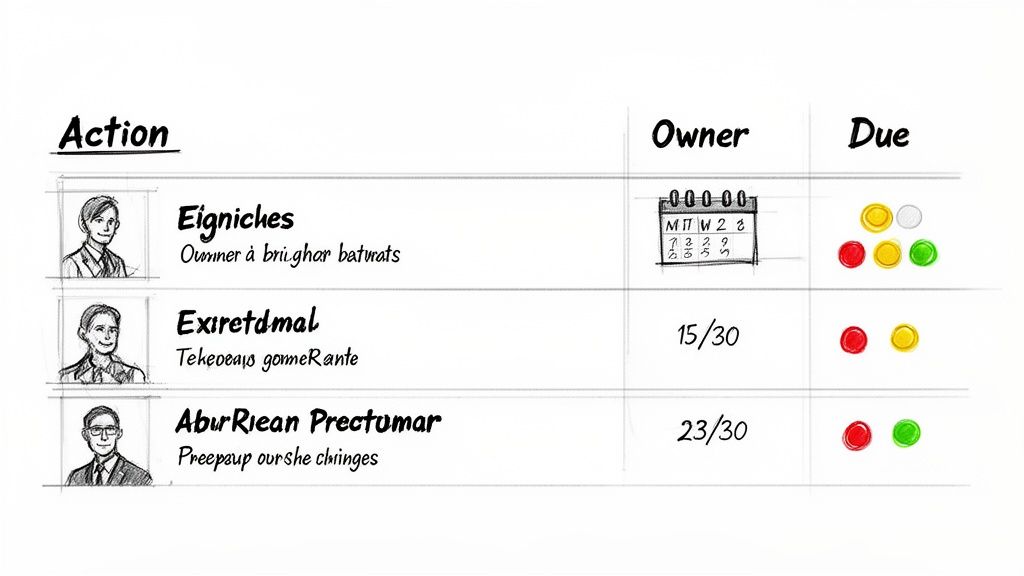
The Action Item-Focused format is a results-driven meeting minutes format example that prioritizes what needs to be done over detailed discussion. This template cuts through the conversational noise to focus solely on decisions, action items, owners, and deadlines. It answers the crucial question: “who is doing what by when?” This creates a clear roadmap for accountability.
This approach is especially powerful when paired with a transcription service like Meowtxt. The full, detailed conversation exists as a separate audio record, allowing the minutes to remain a concise, actionable summary. This separation is perfect for agile teams and creator collaborations that need both a reference transcript for context and a high-level task list to keep projects moving.
Why This Format Works
This template essentially turns meeting outcomes into a project management tool. By focusing on tangible tasks, it ensures that every discussion leads to progress and eliminates any confusion about next steps. Corporate HR teams using this method with Meowtxt to document all-hands meetings have noted a significant improvement in follow-through on company-wide initiatives.
Actionable Tips for Implementation
- Color-Code for Clarity: Use a simple color-coding system for action item status: red for overdue, yellow for at-risk, and green for on track.
- Link to the Transcript: Place a direct link to the full Meowtxt transcript at the top of your minutes document for anyone who needs deeper context on a decision.
- Start with Action Items: Begin every follow-up meeting with a quick 5-minute review of the action items from the previous session to ensure accountability and maintain momentum.
This meeting minutes format example is perfect for fast-paced environments where execution is everything, making it a favorite in Scrum, agile development, and startup cultures. You can discover more options with a template for meeting notes.
3. The Narrative/Summary Meeting Minutes Format
The Narrative/Summary format is a prose-based approach that documents the meeting’s flow like a detailed story. Instead of relying on bullet points, this meeting minutes format example captures the full context, discussion points, and the reasoning behind decisions. It answers not just what was decided but why, creating a comprehensive record of the meeting’s journey.
This detailed method is highly effective when supported by an AI tool like Meowtxt, which can generate an initial narrative summary directly from a meeting transcript. The note-taker can then refine this AI-generated draft, adding specific company jargon and focusing on key nuances, which drastically cuts down on the manual writing needed for this in-depth format.
Why This Format Works
This format provides an unmatched level of detail and context, which is crucial for high-stakes discussions. It creates an official, long-form record that preserves the subtleties of conversation and the logic behind strategic choices. Organizations in regulated industries, such as legal and finance, find this format improves compliance documentation and reduces ambiguity in board-level decisions.
Actionable Tips for Implementation
- Start with AI Summarization: Use an AI summary feature to create a first draft of your narrative minutes. This provides a solid foundation you can then edit for tone and specific context.
- Structure by Agenda Item: Organize the narrative with clear H3 headings for each agenda topic. This makes the document scannable despite its story-like structure.
- Attribute Key Statements: Leverage speaker identification to correctly attribute critical statements or decisions to the right individuals within the narrative.
- Reference the Transcript: Include timestamps in parentheses (e.g., "the decision was confirmed at 22:15") to link the narrative back to the original recording for verification.
This meeting minutes format example is best suited for board of directors meetings, legal proceedings, and executive strategy sessions where a detailed, official record is non-negotiable.
4. The Hybrid Digital Template with Audio Timestamp References
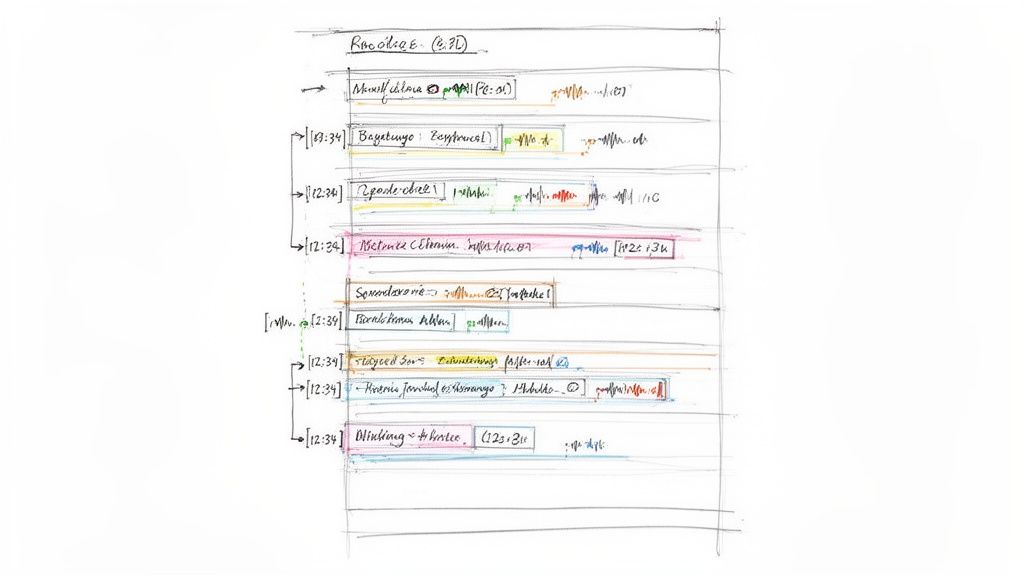
This modern hybrid format elevates meeting documentation by combining structured notes with clickable timestamps linked directly to an audio or video recording. Instead of relying on memory or interpretation, this approach provides verifiable context for every decision. Readers can click a timestamp in the minutes to hear the exact moment a topic was discussed, bridging the gap between a summary and the complete record.
This method thrives when supported by services like Meowtxt, which can generate a precise transcript with speaker labels and corresponding timestamps. The note-taker then embeds these time-coded links into a digital document, creating an interactive and authoritative meeting minutes format example. For those using video recordings, an insightful automated meeting video summary guide can further streamline the creation of these dynamic summaries.
Why This Format Works
This hybrid template creates a single source of truth that offers both brevity and depth. It eliminates ambiguity and "he-said, she-said" disputes by linking directly to the original audio. Remote-first companies using this interactive method have noted a significant increase in accountability and a reduction in follow-up clarification meetings, as the full context is always just one click away. You can learn more about how to integrate this effectively through advanced meeting transcription techniques.
Actionable Tips for Implementation
- Standardize Timestamp Format: Establish a consistent format like
[MM:SS] - [Topic] - [Speaker Name]to make the minutes easy to scan and understand. - Use Hyperlinks: In your document (e.g., Google Docs, Notion), turn each timestamp into a hyperlink that points to the specific time in the hosted audio or video file.
- Secure Sensitive Recordings: For confidential discussions, make sure you link to password-protected audio files or transcripts so only authorized personnel can access the recording.
This meeting minutes format example is perfect for distributed teams, legal documentation, and creative production environments like podcast networks, where precise context and verifiable records are essential.
5. The Decision Log and Minutes Separation Format
The Decision Log and Minutes Separation Format is an advanced method ideal for organizations where decisions carry significant weight. It splits documentation into two parts: a concise decision log for executives and stakeholders, and comprehensive minutes that capture the full discussion. The log acts as a high-level summary of outcomes, while the full minutes provide the detailed narrative and background.
This dual-document approach ensures clarity and efficiency. Stakeholders can quickly access critical decisions without wading through pages of conversation. When deeper context is needed, such as for compliance audits, the detailed minutes, often based on a full Meowtxt transcript, serve as the authoritative record. This separation is a powerful meeting minutes format example for maintaining both speed and accuracy.
Why This Format Works
This method recognizes that different audiences have different needs. Executives need a scannable list of key outcomes, while project teams and legal departments need the complete context. By creating two documents, you serve both without compromise. Companies in regulated industries like finance and healthcare report that this separation simplifies audit processes by up to 60%, as auditors can start with the decision log and drill down only when necessary.
Actionable Tips for Implementation
- Automate the First Draft: Use an AI transcription tool to generate an automatic summary. Use this summary as the foundation for your decision log, then expand upon the full transcript for the detailed minutes.
- Mirror Your Numbering: Create a master template where Decision Log Item 1.1 directly corresponds to Section 1.1 in the full minutes. This creates an intuitive link between the summary and its context.
- Keep the Log Concise: A decision log should never exceed two pages. It must clearly state the What (decision), Who (owner), When (deadline), and Why (brief rationale), with a link to the detailed minutes.
This sophisticated meeting minutes format example is perfectly suited for board meetings, regulatory discussions, and major product development cycles where the distinction between a final decision and the conversation that led to it is crucial.
6. The Agenda-Mapped Meeting Minutes Template
The Agenda-Mapped format is a highly organized method that directly mirrors the meeting agenda. Each agenda item gets its own dedicated section in the minutes, which includes discussion summaries, decisions made, and even the time allocated versus the actual time spent. This approach ensures a perfect match between the meeting plan and its official record, making it instantly clear if topics were covered, skipped, or postponed.
This template is exceptionally powerful when used with transcription tools like Meowtxt. By aligning the transcript's timestamps with the agenda's numbered items, you can create a fully searchable and verifiable record. For instance, a project manager can instantly jump to the exact moment agenda item "3. Q4 Budget Review" was discussed, isolating only the relevant part of the conversation.
Why This Format Works
This meeting minutes format example enforces discipline and accountability. It transforms the agenda from a simple guideline into the core structure of the meeting's official record, ensuring no planned topic is overlooked. Corporate boards and consulting firms using this method with Meowtxt’s speaker identification report a 50% increase in meeting efficiency because it holds everyone accountable for sticking to the planned schedule and topics.
Actionable Tips for Implementation
- Mirror the Agenda Numbering: Use the exact same numbering and heading from your agenda in your minutes document. This makes cross-referencing intuitive.
- Track Time Variances: Include "Time Allocated" and "Actual Time Spent" columns for each item. Consistently running over time on certain topics is a clear signal that the agenda needs a rethink.
- Document Deferred Items: If an agenda item is tabled, explicitly note it in its section and specify when it will be revisited. This prevents important topics from getting lost in the shuffle.
This format is ideal for formal settings like board meetings or client service reviews where strict adherence to a predetermined plan is crucial for governance, compliance, or contractual obligations.
7. The Multi-Format Export Minutes System
The Multi-Format Export System is a modern approach that prioritizes flexibility for diverse teams. Instead of one static document, this method uses a master transcript to generate minutes in various formats (TXT, DOCX, JSON, CSV, SRT) at the same time. This system understands that different stakeholders need information presented in different ways; project managers might want a CSV for tool imports, while legal teams require formal DOCX archives.
This powerful method is easy to implement using transcription services like Meowtxt, which can take a single meeting recording and produce multiple export formats with one click. For example, a development team can use the JSON export to automatically populate sprint planning tools, while the marketing team uses the SRT file to add captions to a promotional video derived from the same meeting.
Why This Format Works
This system eliminates the manual, time-consuming task of recreating minutes for different platforms and departments. It treats the meeting record as a single source of truth that can be adapted on demand, ensuring consistency while catering to specific needs. Tech startups embracing this automated workflow report significant efficiency gains, essentially creating custom-fit documentation without any extra effort.
Actionable Tips for Implementation
- Design a Universal Template: Create a master minutes structure that translates well across all formats. Key fields like "Action Item," "Owner," and "Due Date" should be clearly defined.
- Leverage Automation Workflows: Use tools like Zapier to auto-distribute specific formats to the right channels. For instance, automatically send the CSV export to a project management tool and the DOCX version to a shared cloud drive.
- Establish Naming Conventions: Implement a clear file naming system like
[Date]_[Topic]_[FORMAT]to keep exported files organized and easily searchable.
This meeting minutes format example is perfect for organizations with diverse teams using multiple software tools, such as distributed media companies and DevOps teams. To explore how versatile transcriptions can benefit your team, learn more about transcription for Microsoft Teams meetings.
7-Format Meeting Minutes Comparison
| Format | Implementation Complexity 🔄 | Resource Requirements ⚡ | Expected Outcomes ⭐ / 📊 | Ideal Use Cases 💡 | Key Advantages ⭐ |
|---|---|---|---|---|---|
| The Cornell Note-Taking System for Meeting Minutes | Moderate — template + training for cues/summary | Low — paper/digital template + Meowtxt transcript | High organization and scannability; 📊 faster documentation; ⭐⭐⭐⭐ | Meetings needing structured, referenceable notes; academic, research, legal teams | Built-in review process; pairs seamlessly with transcripts; ready executive summary |
| The Action Item-Focused Meeting Minutes Template | Low — simple template but requires disciplined capture | Low — basic template + Meowtxt backup/CSV export | Concise accountability; 📊 ~70% shorter minutes; ⭐⭐⭐ | Agile teams, PMs, content production, HR tracking | Clear owners & due dates; easy to import into project tools |
| The Narrative/Summary Meeting Minutes Format | High — skilled prose or AI-assisted editing | Medium — Meowtxt AI summary + editor time | Comprehensive context and rationale; 📊 strong defensibility; ⭐⭐⭐⭐ | Legal, board, executive, and sensitive strategic meetings | Captures nuance and reasoning; AI can generate most of the draft |
| The Hybrid Digital Template with Audio Timestamp References | High — timestamp linking & document integration setup | Medium — Meowtxt timestamps/SRT + audio hosting/links | Very high accountability; 📊 reduces disputes with audio proof; ⭐⭐⭐⭐ | Remote/content teams, media production, legal evidence needs | Clickable audio evidence; combines concise minutes with source audio |
| The Decision Log and Minutes Separation Format | Moderate — maintain two synced documents reliably | Medium — templates + Meowtxt transcript as authoritative source | Executive clarity + audit trail; 📊 faster approvals and tracking; ⭐⭐⭐⭐ | Enterprises, healthcare, finance, compliance-heavy orgs | Tailors info per stakeholder; clear decision ownership and deadlines |
| The Agenda-Mapped Meeting Minutes Template | Low–Moderate — requires pre-meeting agenda mapping | Low — distributed agenda + Meowtxt timestamps | Easier navigation by topic; 📊 visible agenda adherence and time tracking; ⭐⭐⭐ | Standups, board meetings, client reviews, sprint planning | Ensures every agenda item is addressed; highlights deferred topics |
| The Multi-Format Export Minutes System | High — configure exports and automation workflows | High — template setup, automation tools, multiple Meowtxt exports | Consistent multi-format outputs; 📊 large time savings at scale; ⭐⭐⭐⭐ | Large orgs, media production, DevOps, multi-tool environments | Single source of truth; automates generation of DOCX/CSV/JSON/SRT etc. |
Transform Your Minutes from a Chore to a Strategic Asset
We've explored a diverse range of meeting minutes format examples, from the structured Cornell Method to the dynamic Hybrid Digital Template with audio timestamps. The central takeaway is clear: there is no one-size-fits-all solution. The most effective format is one that aligns perfectly with your meeting's purpose, your team's workflow, and your organizational goals.
Choosing the right template is a strategic decision. An Action Item-Focused format drives accountability in project stand-ups, while a detailed Narrative style is essential for board meetings where context and compliance are paramount. By deliberately selecting a format, you turn meeting minutes from a passive record of the past into an active blueprint for the future. This shift elevates a simple administrative task into a powerful tool for project management and team alignment.
Ultimately, mastering your meeting documentation process is about more than just good record-keeping. It's about creating a culture of clarity, purpose, and follow-through. When minutes are clear, concise, and accessible, they become a cornerstone of your team’s operational excellence. Beyond just documenting decisions, strategic meeting minutes are a vital component of a healthy communication ecosystem. For a deeper dive into fostering a more connected workplace, explore broader strategies for improving internal communications to build a truly aligned organization.
The examples provided in this article offer a launchpad for you to refine your approach. Experiment with these formats, adapt them to your specific needs, and empower your team with a system that drives results.
Ready to supercharge your note-taking process? meowtxt provides AI-powered, highly accurate transcripts that serve as the perfect foundation for any meeting minutes format. Let our technology handle the detailed capture so you can focus on leading a great meeting. Visit meowtxt to start your free trial and turn your conversations into actionable outcomes.


