
Learning how to transcribe audio files is pretty straightforward: you can either type it all out by hand, or you can use an AI-powered service to handle the heavy lifting. For most people today, AI transcription is the clear winner, converting hours of tedious work into an editable, searchable document in just a few minutes.
Why Mastering Audio Transcription Matters
We're all drowning in audio and video, but text remains the key to making any of it discoverable, searchable, and accessible. Knowing how to transcribe audio files isn't just a niche skill for journalists anymore; it’s a crucial tool for almost any professional looking to get more out of their content.
Market trends tell the same story. The global AI transcription market is experiencing explosive growth, projected to jump from $4.5 billion in 2024 to a staggering $19.2 billion by 2034. This isn't just a fleeting trend; it’s a fundamental shift away from slow, manual work toward tools that deliver speed and impressive accuracy. You can dig deeper into the growth of automated transcription statistics if you're curious.
Unlocking Value from Spoken Words
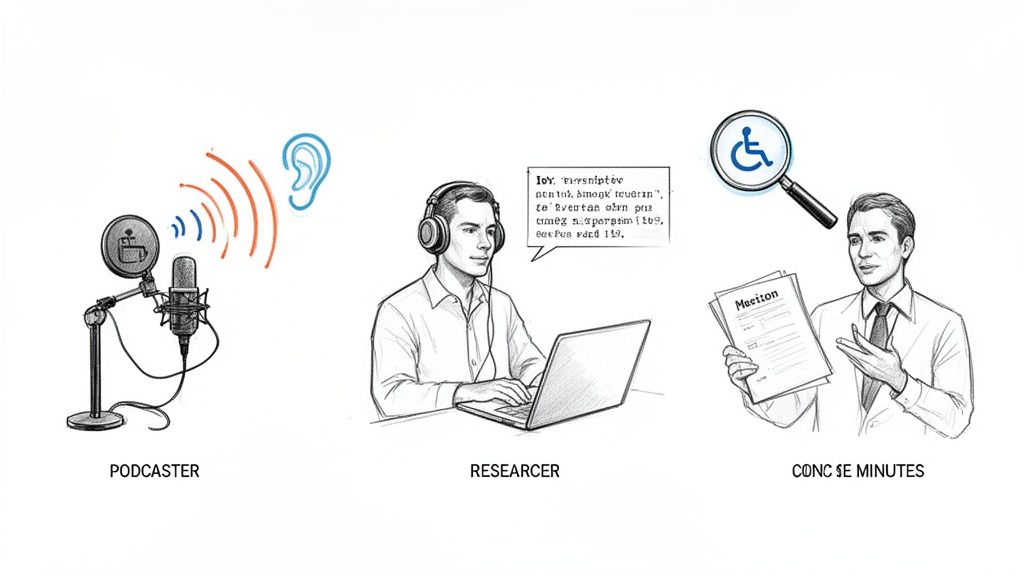
Think about how frustrating it is to scrub through an hour-long podcast just to find that one killer quote. Transcribing audio files solves that problem instantly by making your content searchable. For content creators, this is a total game-changer.
- Podcasters and YouTubers: Easily turn your episodes into blog posts. This makes your content visible to search engines, pulling in a whole new audience from Google.
- Researchers and Students: Forget re-listening to hours of interviews. A transcript lets you quickly analyze your data, pulling key insights and quotes with a simple text search.
- Business Professionals: Create precise, actionable meeting minutes. This ensures everyone is on the same page about key decisions and action items.
But it goes beyond convenience. Transcription is a cornerstone of accessibility, opening up your audio and video to people who are deaf or hard of hearing and ensuring your message reaches a wider, more inclusive audience.
Key Takeaway: Transcription bridges the gap between spoken content and the written word. It transforms your audio files from a passive listening experience into an active, searchable, and shareable asset that drives real value.
This guide will walk you through the entire process of how to transcribe audio, from prepping your file for the best results to choosing the right method for your needs.
Get Your Audio Ready for Transcription
Before you upload a single file, remember the golden rule of transcription: garbage in, garbage out. The final accuracy of your transcript depends almost entirely on the quality of your source audio. Spending a few minutes on prep now will save you hours of frustrating editing later.
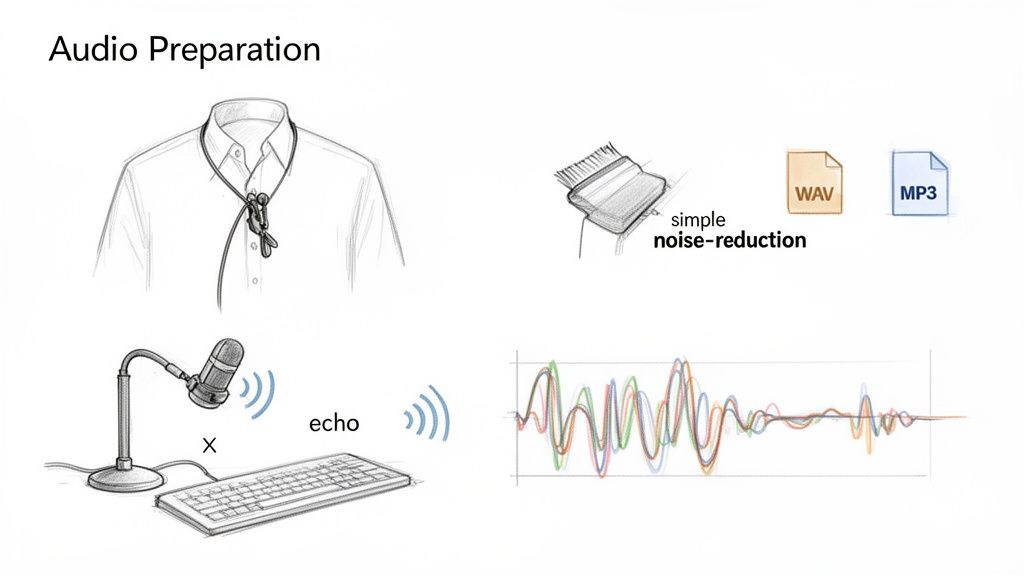
It’s not just about using a "good" mic; it's about using the right mic for the job. A cheap lapel mic clipped to a speaker’s shirt will nearly always outperform an expensive studio mic placed a few feet away. Why? It isolates their voice, cutting out distracting keyboard clicks and room echo that can confuse transcription algorithms.
Even with a perfect mic, sneaky background noise can ruin a recording. That low, constant hum from an air conditioner or a computer fan is a classic culprit that can easily trip up an AI.
Simple Fixes for Common Audio Problems
You don't need a professional sound booth to get clean audio. Free, accessible tools can work wonders. A program like Audacity, for example, has a simple "Noise Reduction" effect. You just select a few seconds of pure background noise, and the software learns what to filter out from the rest of the file. It's surprisingly effective for getting your audio file ready.
Your recording environment also makes a huge difference. Rooms with bare walls and hard floors create echo, smearing words together. The easy fix? Record in a space with soft surfaces. A carpeted bedroom with curtains works great because the fabric absorbs sound, giving you a much cleaner signal. Understanding the critical role of sound quality is the first step toward a great transcript.
Pro Tip: If you're recording a remote interview, always ask your guest to wear headphones. This simple step prevents their computer speakers from bleeding into their microphone, which is a common source of echo and garbled audio that AI just can’t handle.
Choosing the Right Audio File Format
The format of your audio file matters more than you might think. MP3s are popular for their small file size, but they use lossy compression. This means some audio data is permanently thrown away to save space, which is bad for transcription accuracy.
For transcription, you want to preserve every bit of detail. Here’s how to choose:
- WAV or FLAC: These are lossless formats. The files are bigger, but they contain the complete, uncompressed audio. This gives the AI the cleanest possible signal to work with, leading to a more accurate transcription.
- MP3 (high bitrate): If you absolutely must use an MP3, save it at the highest possible bitrate, like 320 kbps. It's still compressed, but it keeps far more detail than a low-quality setting.
This principle holds true even if you didn't create the original recording. For instance, if you’re transcribing a video, you'll get a better result by extracting the audio into a lossless format first. You can learn how to properly extract audio from a YouTube video to maintain its quality.
Ultimately, by starting with a clean, high-fidelity source file, you’re setting yourself up for a fast, accurate transcript that is easy to edit.
Choosing Your Transcription Method: AI vs. Manual
So, you have an audio file ready to go. Now comes the big decision: how are you going to turn that recording into text? This is a fork in the road that defines your whole workflow. Are you going to roll up your sleeves and type out every word by hand, or let an AI tool do the heavy lifting?
This isn’t just about picking the “easy” option. It’s about matching the right tool to the job.
A journalist transcribing a short, highly sensitive interview might still prefer the absolute control of doing it manually. You catch every subtle pause, double-check the spelling of every name, and keep the data completely offline. But let's be honest—that approach just doesn't scale.
The Rise of AI Transcription
For a podcaster with a weekly show or a team with daily meeting recordings, the sheer speed and efficiency of an AI service like Meowtxt are game-changing. AI transcription, which runs on Automatic Speech Recognition (ASR), can churn through an hour of audio in just a few minutes, not hours.
(If you're curious about the tech behind it all, we have a great guide explaining what ASR is and how it actually works.)
Modern AI isn't just fast; it's startlingly accurate. Top-tier services now hit up to 97.5% accuracy on clear audio, delivering a draft that usually only needs a quick proofread. This blend of speed and precision is why so many professionals have ditched the old way of transcribing audio.
The market backs this up, especially as remote work has made recorded meetings the norm. The AI meeting transcription space alone is projected to rocket from $3.86 billion in 2025 to an incredible $29.45 billion by 2034. It's a massive shift.
Key Insight: The choice between AI and manual isn't about which is "better." It's a strategic decision based on what you value most: speed, cost, volume, or the sensitivity of your content.
AI Transcription vs. Manual Transcription At a Glance
To help you choose, here’s a clear comparison to help you decide which transcription method best fits your needs, budget, and timeline. Think of it like choosing between a handsaw and a power saw. One gives you meticulous control for small, detailed cuts, while the other helps you tear through a huge amount of work in no time.
| Feature | AI Transcription (e.g., Meowtxt) | Manual Transcription |
|---|---|---|
| Speed | Blazing fast—transcribes 1 hour of audio in minutes. | Painfully slow—takes 4-8 hours per hour of audio. |
| Cost | Super affordable, often just pennies per minute. | Can get very expensive, often hundreds of dollars per hour. |
| Accuracy | Up to 97.5% on clear audio; might miss some jargon or names. | Can be near 100%, depending on the transcriber's skill. |
| Best For | Podcasts, meetings, interviews, content creation, high volume. | Sensitive legal/medical data, poor audio, nuanced dialogue. |
| Effort Required | Minimal—upload the file and do a quick final review. | High—requires hours of focused typing and listening. |
For most people figuring out how to transcribe audio files today, the scales have tipped decisively toward AI. The combination of low cost, incredible speed, and surprisingly high accuracy makes it the default choice for anyone who wants to turn spoken words into useful text without losing an entire day in the process.
Your Workflow for Using an AI Transcriber
Picking an AI tool is one thing, but knowing the actual workflow is what makes you fast and efficient. Let's walk through the real-world process of using a modern AI transcriber, using Meowtxt as our main example. This isn’t just a list of features; it's a playbook for turning raw audio into a polished, usable document.
The whole process kicks off with a simple file upload. Most modern services, including Meowtxt, use a drag-and-drop interface that works right in your browser. You can pull an MP3, WAV, or even an MP4 video file directly into the window, and the platform gets to work. No clunky software to install or confusing settings to figure out.
From Raw Text to Polished Transcript
Once your file is uploaded, the AI transcription engine chews on the audio and spits out a raw text draft, usually in just a few minutes. This initial transcript is the foundation you'll build on. And while today's AI is seriously impressive, the most important part of the workflow is still the human review.
This is where you shift from automation to refinement. A good tool will give you an interactive editor that lets you play the audio while the corresponding text is highlighted in real-time. As you listen, you can instantly click on any word to fix misspellings, add punctuation, or clarify industry-specific jargon the AI might have misunderstood.
Pro Tip: Don't try to edit the transcript from top to bottom like you're reading a novel. Instead, play the audio at 1.5x speed and just scan the text. Your brain is surprisingly good at spotting words that look out of place, letting you pause and make corrections far more efficiently.
Using Speaker Labels and Timestamps
For recordings with more than one person—think interviews, podcasts, or team meetings—speaker identification is an absolute lifesaver. The AI automatically detects different voices and assigns generic labels like "Speaker 1" and "Speaker 2." Your first job during the review is to quickly swap these generic tags with the actual speakers' names. This usually takes less than a minute.
Likewise, timestamps are incredibly valuable. They link every single word or paragraph back to a specific moment in the audio file. This makes it ridiculously easy to find and double-check key quotes or revisit a confusing section without having to scrub through the entire recording by hand.
This flowchart gives you a simplified look at how the manual and AI-driven transcription processes stack up.
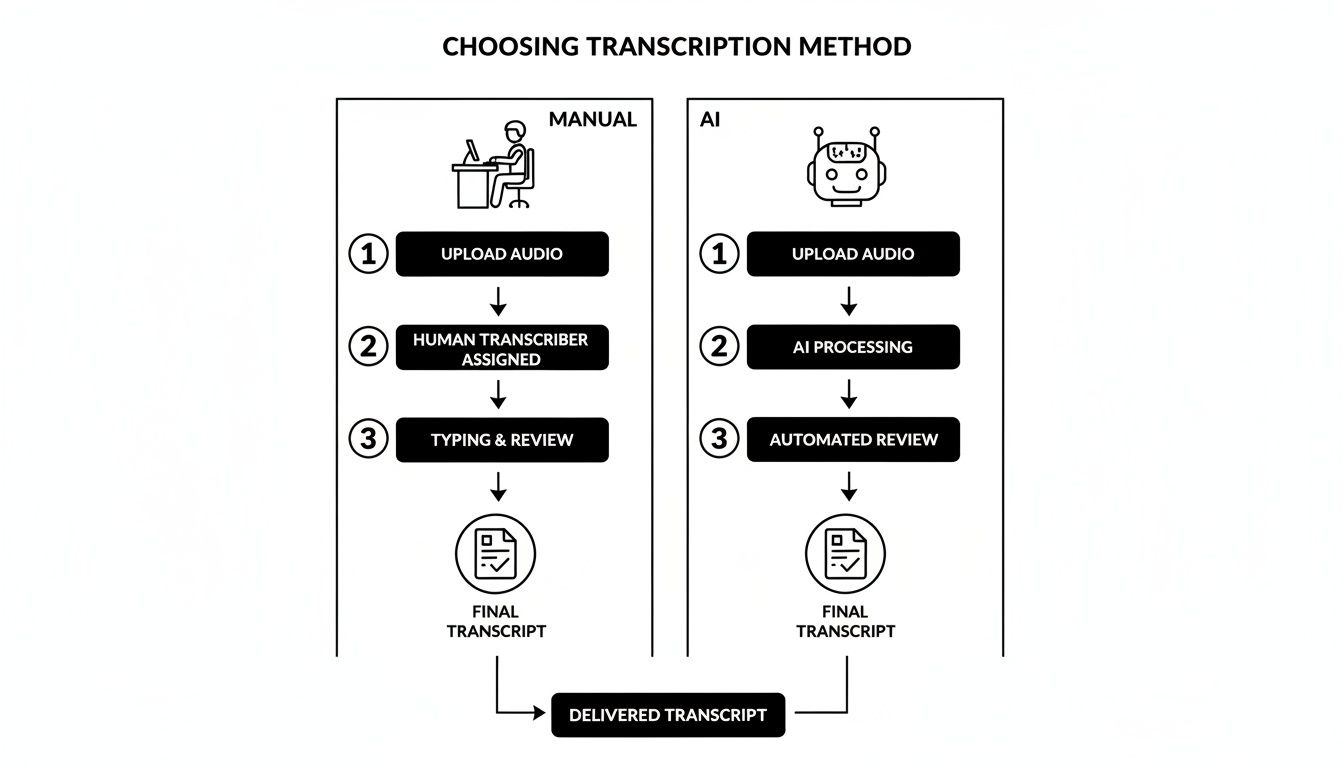
As you can see, AI dramatically cuts down the initial drafting time, shifting your effort away from tedious typing and toward high-value editing. When you're thinking about your own workflow, it's worth seeing how platforms offering Aonmeetings' AI-powered transcriptions can help save time while keeping things accurate.
The evolution of this tech has been nothing short of remarkable. We've gone from clunky 70% error rates in the 1990s to today’s impressive 97.5% accuracy benchmarks. This leap has completely changed the game for everyone from YouTubers to legal pros. In fact, data shows that 75% of legal professionals now use AI for depositions, while content creators report saving an average of 12 hours every single week. When you adopt this workflow, you're not just getting a transcript; you're getting your time back.
Putting Your Final Transcript to Work
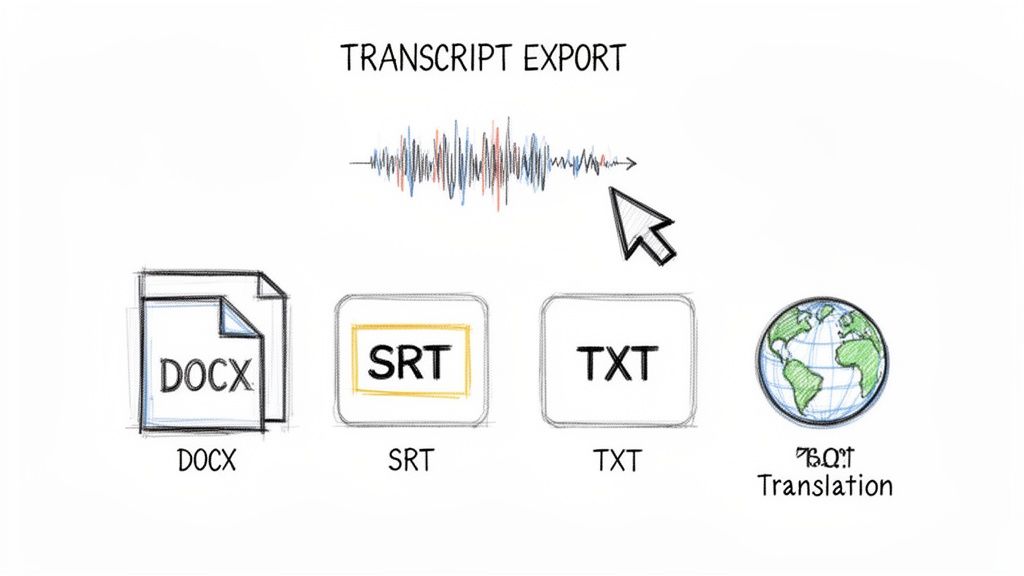
Once your transcript is polished and ready to go, the real work can begin. Getting the raw text is just step one; the true value comes from how you actually use it. Your final document is a flexible asset that can be reshaped for all sorts of goals, and choosing the right export format is your first move.
Think of it like saving a file from a word processor. You wouldn't use a PDF for a quick draft or a plain text file for a formal report. The same logic applies here, and modern transcription tools give you a handful of options, each tailored for a specific job.
Choosing the Right Export Format
Where your project is headed dictates the file type you'll need. A simple copy-and-paste might work for personal notes, but for professional workflows, you need a format that plays nicely with other platforms.
Here are the most common choices and what they're best for:
- TXT (Plain Text): This is your no-frills, universal option. It’s perfect for quickly grabbing a block of text to drop into an email, a Slack message, or your personal notes. It strips away all formatting, leaving just the raw words.
- DOCX (Word Document): When you need to draft a formal report, write up meeting minutes, or turn an interview into an article, DOCX is your best bet. It preserves essential formatting like paragraphs, making it easy to edit further in Microsoft Word or Google Docs.
- SRT (SubRip Subtitle File): This one is non-negotiable for anyone working with video. An SRT file contains not just the text but also the precise timestamps needed to display captions on platforms like YouTube and Vimeo. For a deeper dive, you can learn more about how to create SRT files for your videos and make your content more accessible.
Key Takeaway: Don't just default to a text file. Picking the right export format from the start saves you a ton of time by ensuring your transcript is immediately ready for its next step, whether that's becoming video captions, a blog post, or a searchable archive.
Beyond Simple Text: Translation and Summarization
A high-quality transcript opens the door to powerful AI features that can multiply its value. Instead of just a record of what was said, your transcript becomes a source for new, condensed insights.
Imagine you just wrapped up a two-hour project kickoff meeting. Nobody has the time (or patience) to reread a 20-page transcript just to find the action items. This is where AI summarization comes in. You can generate a concise summary in seconds, pulling out the key decisions, deadlines, and who’s responsible for what.
Then there’s translation. This capability lets you take your content global in an instant. A podcast episode transcribed in English can be translated into Spanish, French, or Japanese, reaching new audiences you couldn't access before. It transforms a single piece of audio into a versatile global asset.
Got Questions? We’ve Got Answers.
Even when you've got the process down, a few questions always pop up. Things like accuracy, turnaround time, and security are top of mind for anyone serious about transcription. Let's tackle some of the most common ones.
Think of this as the practical advice you'd get from someone who’s been in the trenches. No fluff, just straight answers to help you transcribe with confidence.
What's the Most Accurate Way to Transcribe Audio?
For the best possible result, nothing beats a hybrid approach. You start with a top-tier AI service, which can hit 97.5% accuracy on clean audio. It does the heavy lifting in minutes, catching the vast majority of what was said.
Then, you do a quick human proofread. This is where you catch the tricky stuff—industry jargon, unique names, or words mumbled with a heavy accent that an algorithm might miss. This combo gives you the lightning speed of AI with the final polish of a human eye, leading to a near-perfect transcript without spending hours doing it manually.
The Hybrid Model: Combining AI speed with a final human review is the gold standard. You get a highly accurate transcript in a fraction of the time it would take to do it from scratch.
How Long Does It Take to Transcribe 1 Hour of Audio?
This is where the difference between methods really becomes clear. The time it takes to get through a 60-minute file varies wildly.
- AI Transcription: An automated tool will process that one-hour file in less than 10 minutes. You'll have a draft ready for a quick review almost immediately.
- Manual Transcription: A seasoned pro needs 4 to 6 hours for that same file. If you’re doing it yourself? Plan on spending 8 hours or more, especially if the audio is complex or your typing speed isn't blazing fast.
The time savings are massive. For anyone creating content regularly, AI is a total game-changer for productivity.
Can I Transcribe Audio Files on My Phone?
Absolutely. Modern transcription tools are cloud-based, so they work just as well on your phone as on your desktop. You aren't actually running the heavy processing on your device; you're just using your phone as a gateway.
You can upload an audio file right from your phone's storage or a linked cloud drive. The provider's servers handle the transcription, and you’ll get a notification when it's ready. From there, you can review, edit, and export the final transcript right from your mobile browser.
Are AI Transcription Services Secure?
Any reputable service makes security a top priority, especially since they're often handling sensitive meetings and interviews. Look for platforms that use end-to-end encryption, which protects your files while they're being uploaded and processed.
Good services also have clear data retention policies. Many will automatically delete your files after a set period, like 24 hours, to protect your privacy. Always take a minute to check the security and privacy policy of any tool before uploading confidential material.
Ready to turn your audio into accurate text in minutes? With Meowtxt, you can drag and drop your files, get a polished transcript, and export it in any format you need. Try it free and see how easy it is to transcribe your audio files at https://www.meowtxt.com.


