
Getting your audio and video files turned into usable text requires a method that’s fast, accurate, and fits seamlessly into your workflow. The right tools can transcribe audio files to text in minutes, converting hours of spoken content from meetings, podcasts, or lectures into searchable, editable documents and saving you a massive amount of manual effort.
Why Transcribing Audio to Text Is a Game-Changer
Turning spoken words into a written document is far more than just a convenience. It’s a strategic move that unlocks the hidden potential in your audio and video content.
Think about it from a podcaster's perspective. After recording a one-hour episode, they need to transcribe the audio file to text. Once done, that single piece of audio becomes the foundation for a dozen different content assets—from an SEO-rich blog post to a handful of social media snippets and detailed show notes for their listeners.
The real magic is that this process makes your audio content discoverable. Search engines can't "listen" to an MP3 file, but they can crawl and index every single word in a transcript. This single step opens up a massive opportunity for visibility, helping new audiences find your work through a simple Google search.
Maximize Your Content's Reach and Value
For professionals and businesses, transcription solves some very real headaches. A legal team can instantly search hours of deposition audio for a key phrase, slashing case preparation time. A market researcher can analyze focus group discussions far more effectively by scanning a written transcript, spotting themes, and quoting participants with perfect accuracy.
The demand for this capability is exploding. The online transcription market is projected to grow from $3.681 billion in 2026 to an incredible $4.517 billion by 2035. This boom is tied directly to the massive growth of digital content, like the more than 4 million podcasts out there and the constant need for YouTube captions, where transcripts can boost SEO by 12-20%. You can dig into the numbers yourself with this online transcription market growth report from Industry Research Co.
Turn Spoken Words into Actionable Assets
Ultimately, when you transcribe audio files to text, you’re creating a permanent, versatile asset. It’s a simple process that delivers some serious practical advantages.
The table below breaks down the key benefits of transcribing your audio files and shows how they apply in different real-world scenarios.
Key Benefits of Transcribing Your Audio Files
| Benefit | Who It Helps Most | Real-World Impact |
|---|---|---|
| Searchability | Content Creators, Researchers, Legal Teams | Instantly find a key quote in an hour-long interview with a simple Ctrl + F search, saving hours of manual scrubbing. |
| Accessibility | Podcasters, Educators, Businesses | Makes content accessible to individuals who are deaf or hard of hearing, broadening your audience and ensuring compliance. |
| Content Repurposing | Marketers, Podcasters, YouTubers | Turn a single video into a blog post, multiple social media updates, and an email newsletter without creating new content from scratch. |
| Enhanced Learning | Students, Corporate Trainees | Convert a dense, two-hour lecture into a searchable study guide, making it easier to review key topics and prepare for exams. |
| Improved Collaboration | Project Managers, Remote Teams | Share a meeting transcript in Slack or Notion so everyone is aligned on action items, eliminating "he-said, she-said" confusion. |
By turning your audio into text, you’re not just making a document. You’re building a searchable, accessible, and repurposable foundation for better communication and growth.
Manual vs. AI Transcription: Which Path Should You Take?
When it comes to turning audio into text, you’re essentially at a fork in the road. One path is the traditional, human-powered route; the other is the super-fast, AI-driven highway. The right choice isn't about which is "better" in a vacuum, but which is the best fit for the job you need to get done.
It all boils down to a classic balancing act: are you prioritizing absolute precision, speed, or cost? Each approach serves a completely different need.
The Case for Manual Transcription
For situations demanding absolute, near-perfect accuracy, manual transcription remains the undisputed champion. Think of a high-stakes legal deposition where a single misplaced word could completely change the meaning of a testimony. In those cases, a human transcriber brings a level of nuance, context, and often, legal certification that an algorithm just can't replicate yet.
A trained professional can effortlessly decipher heavy accents, filter out overlapping conversations, and understand niche industry jargon that would trip up an AI. This method is meticulous and thorough, but that precision comes at a cost—it's significantly slower and much more expensive. For a researcher analyzing one critical focus group session, that investment is almost always worth it.
Choosing manual transcription is like hiring a skilled artisan for a custom job. You're paying for their expertise, judgment, and the guarantee of a handcrafted, highly accurate result, which is essential for high-stakes legal or medical work.
The Rise of AI Transcription
On the other side of the coin, AI transcription services have completely changed the game for anyone who needs speed and has a lot of audio to get through. A media team with 20 hours of interview footage due by morning simply doesn't have time for the manual route. They need a tool that can chew through massive files quickly and affordably.
This is where AI shines. Automated tools can transcribe an hour-long podcast into a full transcript in just a few minutes, not days. The accuracy has become surprisingly good, often hitting over 95% with clear audio. For podcasters, marketers, and students who just need a searchable, workable text version of their audio—and need it fast—AI is the clear winner.
This massive shift is reflected in the market's explosive growth. The global AI transcription market is rocketing from $4.5 billion in 2024 to a projected $19.2 billion by 2034, an incredible 15.6% annual growth rate. This surge shows just how effectively automated tools are solving the scale problem that manual methods could never handle. For more on this, check out the latest automated transcription statistics on Sonix.ai.
Most modern speech-to-text tools are designed to be incredibly user-friendly, with simple drag-and-drop interfaces.
As you can see, the focus is on getting you from audio file to text document with as few clicks as possible.
Deciding between these two paths isn’t always easy, and often the best tool depends on the specific project. To help you weigh your options, here’s a quick breakdown of how they stack up.
Manual Transcription vs. AI Transcription at a Glance
| Feature | Manual Transcription | AI Transcription (e.g., Meowtxt) |
|---|---|---|
| Accuracy | Up to 99%+ | Up to 97.5% with clear audio |
| Speed | 24-72 hours per audio hour | A few minutes per audio hour |
| Cost | $1.50 - $5.00+ per minute | $0.02 - $0.25 per minute |
| Best For | Legal depositions, medical records, research requiring verbatim detail | Podcasts, interviews, meetings, content repurposing, academic notes |
| Handling Complexity | Excellent with accents, jargon, and overlapping speakers | Can struggle with heavy background noise or multiple speakers |
| Scalability | Limited by human availability | Nearly unlimited; can process hundreds of files at once |
Ultimately, AI has made transcription accessible to everyone, not just those with deep pockets. It's fast, affordable, and accurate enough for the vast majority of day-to-day tasks.
If you’re a content creator, researcher, or marketer looking to explore your options, our guide on the best audio-to-text converter tools is a great place to start.
Your AI Transcription Workflow: From Audio File to Editable Text
Alright, you've decided to go the AI route. Smart move. Now, let's nail down a solid workflow that makes the process to transcribe audio files to text a simple, repeatable part of your process instead of a chore.
Think of it like cooking: the final dish is only as good as your ingredients. In transcription, your audio file is the main ingredient. If you feed the AI a messy file—one with loud background chatter, people talking over each other, or recorded with a cheap mic—you're going to get a less-than-stellar transcript back. It’s simply garbage in, garbage out.
That's why a little prep work goes a long way. Before you even think about hitting "upload," take a few minutes to clean up your audio. Trust me, even a few simple tweaks can make a massive difference in the final text quality.
Prepping Your Audio for Peak Accuracy
First things first: get your audio as clean as possible. While modern AI is incredibly powerful, it's not magic. It works best when it has a clear, crisp signal to analyze.
Here are a few things that can dramatically improve your results:
- Kill the background noise. Use basic audio editing software (even free ones) to filter out annoying hums, hisses, or street noise. A quiet recording space is always the best starting point, but post-production helps.
- Isolate speakers if you can. If you're recording a multi-person interview, having each voice on a separate audio track is a game-changer for speaker identification. This isn't always possible, but for podcasters, it's a must.
- Check the file format. Most AI services, including Meowtxt, happily accept common formats like MP3, WAV, and MP4. Stick with these to avoid any annoying conversion hiccups.
If you're dealing with specific types of audio, like interviews, you might want to look into a dedicated podcast transcription tool. They're often fine-tuned for the unique challenges of conversational recordings.
The Drag-and-Drop Process
Once your audio is prepped and ready, the rest of the process is almost laughably simple. Modern transcription platforms are designed to be as user-friendly as possible, often boiling the entire upload and transcription process down to a few clicks.
Just look at the difference in workflows.
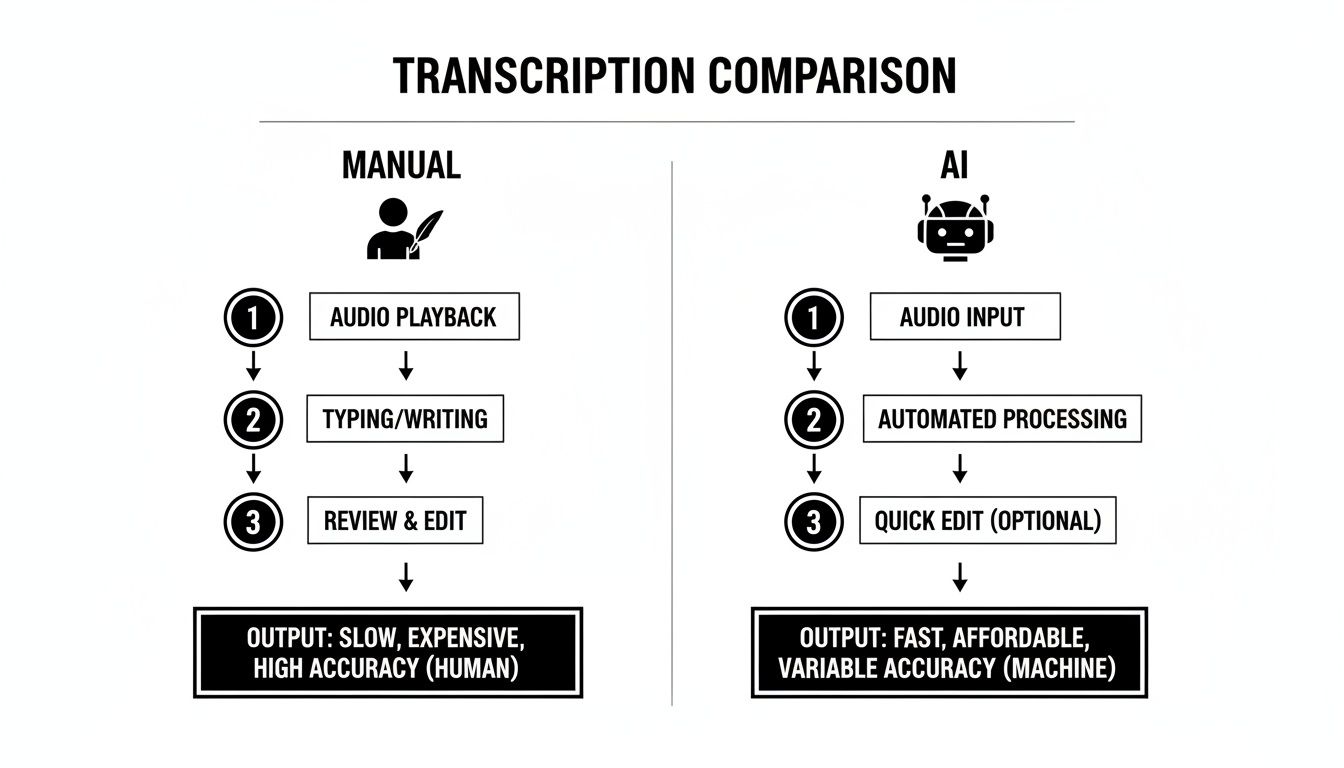
This visual says it all. Manual transcription is a long, winding road with multiple human touchpoints. The AI path? It's a straight shot from your file to a finished text document.
This simplicity is why the market is booming. In the U.S. alone, transcription services were valued at $30.42 billion in 2024 and are projected to hit $41.93 billion by 2030. A massive chunk of that growth is coming from cloud-based software that delivers the speed and scale media teams and developers need.
The whole point of modern AI transcription is to eliminate friction. The goal is to get you from a raw audio file to a fully editable transcript in the shortest time possible, with zero technical expertise needed.
After you drag and drop your file, the AI kicks into gear. It slices the audio into tiny segments, analyzes the sound patterns, and matches them to words and phrases from its enormous language database. The entire operation to transcribe audio files to text is often completed faster than the audio's runtime, delivering a full transcript in minutes, ready for you to polish and use.
How to Polish Your Transcript for Professional Results
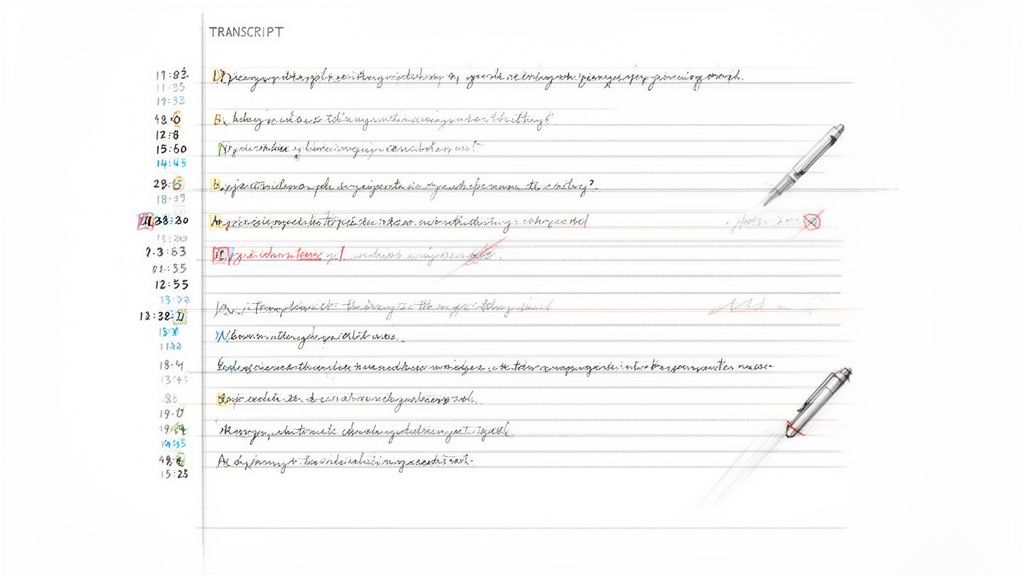
Think of your AI-generated transcript as a really solid first draft. It’s probably about 95% of the way there, but that final 5% is where human judgment turns a functional document into a polished, professional one. This is the editing pass where you add the clarity and context that algorithms can’t quite nail yet.
The good news is that this doesn't have to be a painful, drawn-out process. Most modern transcription services are designed to make this final review quick and easy, so you’re spending minutes making corrections, not hours.
Quick and Efficient Review Techniques
The single most powerful tool you have for a fast review is the timestamp. Any decent transcription platform will link every single word directly to its moment in the audio file. This feature is a total game-changer for editing speed.
When you spot a word that looks a little off, just click on it. The audio will instantly jump to that exact spot, letting you hear what was actually said. It's a simple trick that lets you fix errors fast without having to scrub through the entire audio file hunting for that one moment.
A few common trouble spots to keep an eye out for include:
- Proper Nouns: AI can struggle with unique names of people, companies, or specific products. A quick scan for these is always a smart first step.
- Technical Jargon: If your audio is full of industry-specific terms, the AI might get creative. For example, it could easily hear "API" and write "a pie."
- Homophones: Words that sound the same but have different meanings (like "their," "there," and "they're") are classic AI trip-ups. A quick proofread easily catches these common mistakes.
This quick review is where you truly refine the output when you transcribe audio files to text, ensuring it’s ready for whatever you need it for.
The goal of the editing pass isn't to re-transcribe the audio. It's a quick, focused review to catch the small but important details that an algorithm might miss, ensuring your final document is completely accurate and easy to read.
The Importance of Speaker Identification
If you’re transcribing an interview, a team meeting, or a podcast with multiple hosts, a raw wall of text is practically useless. You can't tell who said what, which completely defeats the purpose of creating a transcript in the first place.
This is where speaker identification (also known as diarization) comes in. This feature automatically detects when a new person is speaking and labels their dialogue accordingly—think "Speaker 1," "Speaker 2," and so on.
During your editing pass, you can quickly replace these generic labels with the actual speakers' names. This one simple step transforms a confusing block of text into a clear, readable conversation. It’s an absolutely essential part of producing a professional-grade transcript for meeting minutes, interview quotes, or legal records.
Formatting for Different Uses
Finally, think about where your transcript is going. The way you format and export the text should match its final destination. Different projects call for different outputs.
For instance:
- A Report or Blog Post: You’ll probably want a clean text file (TXT) or a Word document (DOCX) that you can easily copy and paste into your content management system or document.
- YouTube Captions: For video content, you'll need an SRT file. This format includes the text along with precise start and end timestamps that sync the words perfectly with your video.
- Development Projects: If you're feeding the text into an application, a structured format like JSON is ideal. It provides the text, speaker labels, and timestamps in a machine-readable format that developers can easily work with.
Getting More Than Just Words: Advanced Features
Once you have a clean, polished transcript, the real fun begins. Modern transcription services have evolved way beyond just converting audio to text. They're now packed with powerful tools designed to save you even more time and unlock entirely new ways to use your content.
For instance, who has time to read a full hour-long meeting transcript? Instead, you can lean on AI-powered summaries. This feature is a lifesaver—it automatically pulls out the key takeaways, action items, and main points, giving you a digestible overview in seconds. It’s perfect for catching up on discussions you missed or sending highlights to your team.
Breaking Down Language Barriers
Another game-changing feature is instant translation. Imagine you just recorded a podcast in English but want to reach a global audience. With a single click, you can translate the entire transcript into dozens of languages, from Spanish to Japanese.
This instantly makes your content accessible to millions of new listeners and readers around the world. Suddenly, the process to transcribe audio files to text is just the first step in a much bigger content strategy, turning one local recording into an international asset.
Modern transcription isn’t just about creating a text file anymore. It’s about adding layers of value through summaries, translations, and security, turning a simple transcript into a multi-purpose business tool.
Security and Pricing: The Practical Side
For many of us, especially those in legal or corporate settings, security is a deal-breaker. When you're handling sensitive client interviews or confidential business meetings, you need to know your data is locked down. The best services understand this and offer robust security measures.
Look for a couple of key features:
- End-to-end encryption: This is non-negotiable. It protects your files while they're being uploaded and while they're stored on the server.
- Automatic file deletion: Services like Meowtxt automatically delete your files after a set period, like 24 hours. This massively minimizes the risk of a data breach.
Finally, think about the pricing model that actually fits your workflow. Many platforms offer volume discounts, which can seriously lower your cost per minute if you have a ton of audio to process. Pay-as-you-go plans are great for occasional use, but subscriptions often offer better value if you have consistent, high-volume needs.
Once your transcript is ready, you can do all sorts of things with it. For video creators, a common next step is to add captions to videos to boost accessibility and engagement. For a deep dive into creating the right file format, check out our guide on how to create SRT files for your videos.
Questions That Always Come Up About Transcription
Even with the perfect workflow, you're bound to have a few questions when you start to transcribe audio files to text. It’s completely normal. Most people wonder about the nitty-gritty details, from how accurate the final transcript will be to what happens to their files once they're uploaded.
Let's clear up some of the most common ones.
How Accurate Is an AI Transcript, Really?
This is usually the first thing people ask, and for good reason. For a clean audio file—think a clear recording, a decent mic, and minimal background chatter—you can expect up to 97.5% accuracy. That’s incredibly good. It means the AI will nail most of the text, and you’ll just be cleaning up a few things like unique names or industry-specific jargon.
Of course, if your audio is messy (think coffee shop noise, people talking over each other, or thick accents), that accuracy will naturally drop. This is exactly why prepping your audio beforehand makes such a huge difference.
What About Multiple Speakers and Privacy?
Handling conversations with several people is another big one. How does the software know who's who? That’s where a feature called speaker identification (or diarization) comes in. The AI is smart enough to analyze the unique vocal patterns of each person and automatically tag their lines, like "Speaker 1" and "Speaker 2." All you have to do during your review is swap those generic labels for the actual names.
Data privacy is another massive concern—and it should be. Any reputable service takes this extremely seriously.
When you upload a file, it should be protected with end-to-end encryption. This is non-negotiable. It ensures no one can intercept the file on its way to the server or while it's stored. For an extra layer of security, look for platforms that automatically delete your files after a short window, like 24 hours.
What File Formats and Sizes Work Best?
People often get stuck on the technical stuff, like which file format to use. While most services are pretty flexible, sticking to the standards will make your life easier.
- For audio: Go with MP3 if you need a smaller file size. If quality is everything, use WAV for uncompressed audio.
- For video: MP4 is the universal choice. It just works, everywhere.
And what if you have a massive file, like a three-hour keynote? Don't worry. Most cloud-based services are built to handle large files without breaking a sweat. The transcription time will scale with the audio length, but the process is exactly the same. You upload it, the AI does its thing, and you get the full transcript back when it's done. That kind of scalability is one of the main reasons to use a dedicated service.
Ready to turn your audio into text without the headache? Meowtxt offers a simple drag-and-drop solution that’s perfect for creators, professionals, and students. Get your first 15 minutes transcribed for free and see just how easy it is.


