
Taking good meeting notes isn’t just about scribbling down what people say. It’s about capturing the critical few things—decisions made, actions assigned, and deadlines agreed upon—that actually move the needle. This simple habit is what separates meetings that propel projects forward from those conversations that just go in circles.
Why Your Meeting Notes Aren't Working
Let’s be honest: most meeting notes are useless. We’ve all seen them. The endless wall of text that gets filed away, never to be seen again. The vague bullet points that create more questions than they answer. If your notes feel like a chore that disappears into a digital black hole, you're not alone.
The problem is that we often treat note-taking as a passive, administrative task. We try to capture everything, turning ourselves into human stenographers, but in doing so, we completely miss the point. The goal isn't to create a perfect transcript; it's to build a clear, actionable blueprint for what comes next.
The Real Cost of Bad Notes
Have you ever left a meeting thinking everyone was on the same page, only to find out a week later your colleague had a completely different takeaway? That's a classic symptom of bad notes. When notes are unclear, they create a ripple effect of misalignment that can stall an entire project.
Picture this: a project manager's notes say, "Look into new marketing software." A developer's notes from the same meeting say, "Begin integration with Marketing Platform X." One implies research; the other implies immediate action. This kind of disconnect happens every day, and it's a direct result of notes that fail to pin down specifics.
This confusion isn't just frustrating; it's expensive. Ineffective meetings drain billions from businesses annually, and a huge chunk of that loss comes from sloppy notes that lead to missed deadlines and garbled communication. US businesses lose around $37 billion every year from unproductive meetings. When you realize there are between 36 and 56 million meetings happening daily, the scale of the problem is staggering. You can explore more on these meeting statistics to see the full picture.
The purpose of meeting notes isn't to remember what was said. It's to create a single source of truth that drives accountability and kills ambiguity.
Good notes are a strategic tool. They ensure every conversation leads to a tangible outcome, turning your meeting summary into an engine that pushes work forward instead of an archive of forgotten ideas.
To really drive this home, let’s look at the difference between the notes we’re used to and the notes that actually get results.
The Real Impact of Traditional vs Effective Notes
This table breaks down the tangible differences in outcomes between standard note-taking and a more strategic, results-driven approach.
| Aspect | Traditional Note-Taking | Effective Note-Taking |
|---|---|---|
| Focus | Capturing everything that was said (verbatim). | Capturing decisions, action items, and deadlines. |
| Outcome | A long, unread document. Confusion and misalignment. | A clear plan. Everyone knows what to do next. |
| Accountability | Vague. "Someone will look into it." | Crystal clear. "Jen will draft the proposal by Friday." |
| Project Momentum | Stalled. Teams wait for follow-up emails for clarity. | Accelerated. Work begins immediately after the meeting. |
| Time Investment | High effort during the meeting, zero value after. | Low effort during the meeting, high value for weeks. |
| Team Alignment | Low. Everyone has their own interpretation. | High. A single, shared source of truth. |
The difference is stark. One creates work and confusion, while the other creates clarity and drives progress.
A New Way to Think About Meeting Notes
So, how do you make the leap? It starts with a simple mindset shift. Stop thinking of your notes as a record of the past and start seeing them as a plan for the future. Every line you write should answer one of these three questions:
- What did we decide? Nail down the final verdict on any discussion point.
- Who is doing what? Assign a clear owner to every single action item. No exceptions.
- By when? Every task needs a deadline. It’s what separates a wish from a commitment.
This change transforms you from a passive listener into an active participant shaping the meeting's outcome. It’s about filtering out the noise to capture the signal.
Luckily, modern tools are making this easier than ever. AI transcription services like Meowtxt can capture every word with near-perfect accuracy, freeing you from frantically trying to type everything. This lets you actually listen, contribute, and focus on identifying the key takeaways that truly matter. When businesses adopt these tools, they often slash follow-up time—some by as much as 70%. That simple change can save hours each week, turning a frustrating task into a powerful productivity driver. By learning how to take effective meeting notes, you’re not just improving a skill; you’re building a system for getting things done.
Preparing for Success Before the Meeting Starts
Great meeting notes don’t happen by accident. They’re the result of a few minutes of prep work that happens long before anyone clicks "Join Meeting."
Walking into a discussion unprepared is like trying to build IKEA furniture without the instructions; you might end up with something that vaguely resembles a chair, but you wouldn't trust it to hold any weight. A little bit of structure beforehand makes the entire process smoother and far more effective.
The goal here is simple: build a framework so you can listen actively instead of scrambling to keep up. When you already know what you need to capture and where it goes, your brain is free to actually engage with the conversation, ask smart questions, and spot the takeaways that matter. This is how you go from being a scribe to a strategic participant.
Get this part wrong, and you can end up in a nasty cycle of confusion and stalled work.
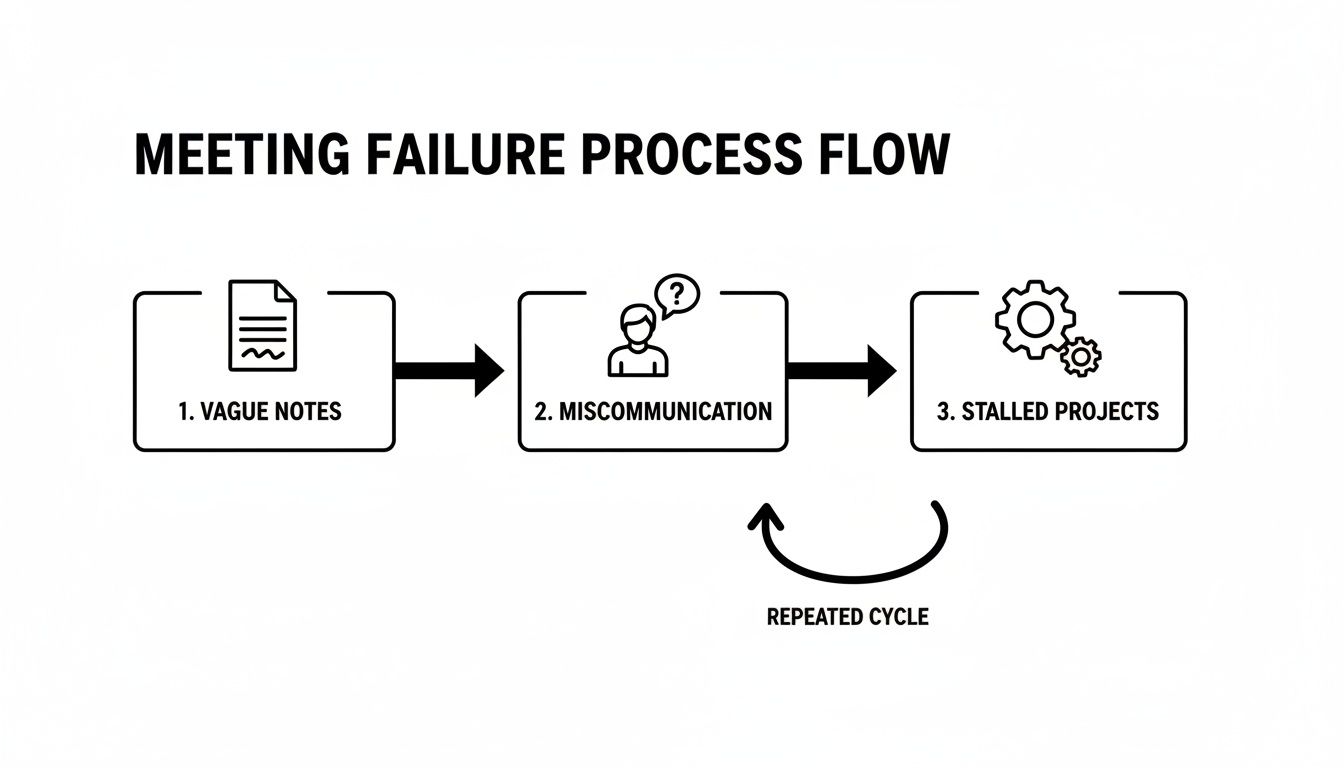
This flowchart nails it. Clear preparation is your first line of defense against miscommunication and project delays.
Define Your Note-Taking Objective
Before you even open a new document, ask yourself one question: “What is the single most important output of this meeting?”
The answer to that question defines your objective. It becomes the filter you’ll use to decide what’s worth writing down. If you don't have a clear goal, you'll fall into the trap of transcribing everything, which ironically makes your notes almost useless.
This objective changes completely depending on the meeting type.
- For a Client Kickoff: Your main goal is probably documenting all client requirements, key stakeholders, and the agreed-upon project scope. Every note should help you build a crystal-clear project charter.
- For a Weekly Team Sync: Here, the objective is to track progress, identify blockers, and lock in next steps for the week ahead. Your notes need to be a snapshot of momentum and accountability.
- For a Brainstorming Session: The focus shifts to capturing raw ideas, emerging themes, and potential avenues to explore. The notes should feel like a wellspring of creativity, not a rigid list of tasks.
Having this singular purpose in mind lets you instantly recognize what’s signal and what’s just noise during the actual conversation.
Build an Agenda-Based Template
Once your objective is clear, build a simple template based on the meeting agenda. A pre-built structure is a secret weapon; it turns note-taking into a fill-in-the-blanks exercise and eliminates the mental load of trying to organize information on the fly.
This doesn't need to be complicated. Just open a new doc and pre-populate it with a few basic sections:
- Meeting Details:
- Date:
- Meeting Title:
- Attendees: (List their names beforehand)
- Agenda Items:
- Literally copy and paste the main topics from the meeting invite. Leave plenty of space under each one.
- Key Decisions Log:
- A dedicated spot just for final verdicts. This is how you stop the team from re-litigating the same issues next week.
- Action Items Table:
- The most crucial part. Create a simple table with three columns: Task, Owner, and Due Date.
A well-structured template turns note-taking from a frantic, reactive activity into a calm, organized process. You're no longer chasing the conversation; you're guiding it into a logical framework.
Set Up Your Tools in Advance
The last piece of prep is getting your tech ready. If you're using an AI transcription service like Meowtxt, make sure it’s configured and ready to go before the meeting starts.
The beauty of this approach is that the AI handles the heavy lifting of capturing every single word accurately, complete with speaker IDs and timestamps.
This frees you up completely. You can use your simple template to focus only on the high-level outcomes—the big decisions and the action items—while the AI creates a perfect, searchable transcript for anyone who needs to reference the details later. You get the best of both worlds: concise, actionable notes and a complete record of the discussion, all without having to sacrifice your own participation.
Choosing the Right Note-Taking Method for Any Meeting
Trying to use the same note-taking style for every meeting is a surefire way to fail. Let's be real: a high-stakes client negotiation demands a totally different approach than a free-wheeling team brainstorm. The real secret to learning how to take effective meeting notes is adapting your method to the situation, making sure you capture exactly what you need without getting bogged down in useless details.
There’s no single "best" method. There's only the one that works for the conversation happening right now. When you pick the right framework ahead of time, note-taking stops feeling like a frantic chore and becomes a strategic advantage. It gives you a structure to lean on, so you can actually listen to the discussion instead of stressing about how to organize your thoughts.
This shift is more critical than ever. With so many of us working remotely or in hybrid setups, clear documentation is the glue holding everything together. Back in 2021, 43% of international association events were already virtual or hybrid. Now, with nearly a third of all meetings spanning multiple time zones, good notes are what keep distributed teams on the same page. You can see more stats about the digitalization of the meetings industry on Statista.com.
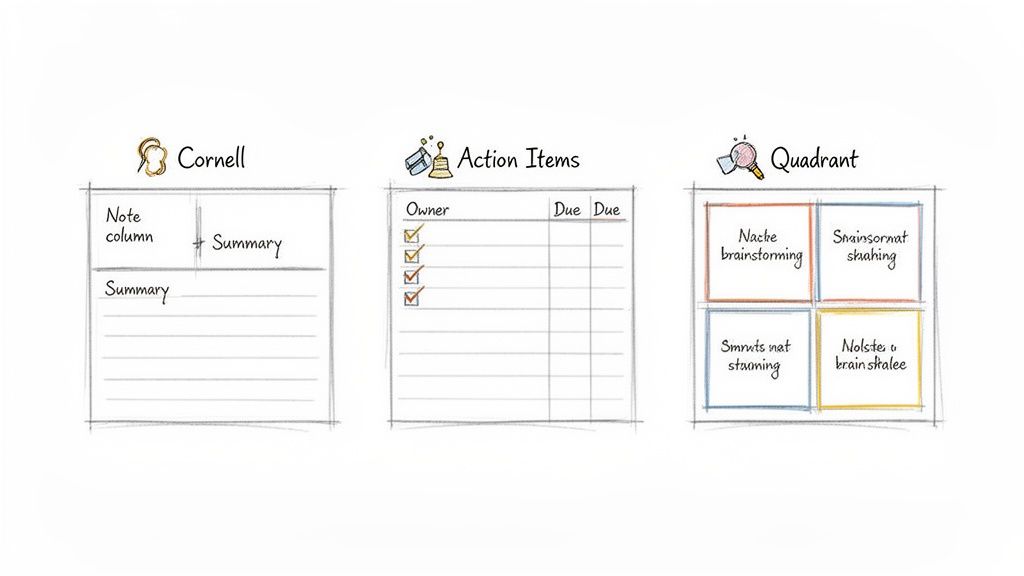
The Cornell Method for Complex Discussions
Originally designed for college lectures, the Cornell Method is a powerhouse for meetings where you're trying to absorb complex information, like a technical deep-dive or a dense strategy session. It forces you to listen actively and process what you're hearing in real-time.
Here’s how you set it up. Just divide your page into three sections:
- Main Notes (Right Column): This is your biggest space. As the discussion unfolds, jot down your notes here. Don’t aim for perfection—use shorthand, abbreviations, and bullet points.
- Cues/Questions (Left Column): After the meeting, go back through your main notes and pull out the big ideas, key questions, and important keywords. List them here. This essentially creates a high-level table of contents.
- Summary (Bottom Section): Finally, boil the entire meeting down to one or two sentences at the bottom of the page. This is a great mental exercise that forces you to identify the core purpose of the conversation.
It's a brilliant method for remembering what was said and creating an instant study guide for yourself.
The Quadrant Method for Brainstorming
When the whole point of the meeting is to generate ideas, not make decisions, a linear list of notes can completely kill the creative vibe. That's where the Quadrant Method comes in. It's perfect for brainstorming, workshops, or any meeting with free-flowing thoughts.
Just divide your page into four equal squares:
- General Notes: A catch-all space for random thoughts or important context.
- Action Items for Me: Any tasks that end up on your plate.
- Action Items for Others: Tasks assigned to the rest of the team.
- Questions: Anything that needs clarification later or could be a topic for another meeting.
This visual layout helps you categorize information on the fly, keeping your personal to-dos separate from broader team ideas. It’s a dead-simple but incredibly effective way to bring order to a chaotic conversation.
Your note-taking method is a tool, not a rule. The best professionals mix and match techniques, or even invent their own, to fit the unique needs of each meeting.
Action-Item Focused Notes for Project Syncs
For weekly syncs, status updates, or any project-focused meeting, the only thing that really matters is forward momentum. In these cases, your notes should be relentlessly focused on one thing: action items.
Forget trying to capture every detail of the conversation. Instead, structure your entire page around a simple three-column table: Action Item, Owner, and Due Date.
During the meeting, your only job is to listen for commitments and fill out that table. This approach cuts through all the chatter and produces a document that is 100% actionable. You can check out a great template for meeting notes that’s built around this principle.
The Modern Hybrid Approach
Ultimately, the most powerful technique today is a hybrid one. You pick a simple framework like the Quadrant or Action-Item method to capture your own high-level thoughts, focusing only on the most critical takeaways.
At the same time, you let an AI tool like Meowtxt run in the background, capturing the full, accurate transcript. This gives you the best of both worlds: a concise, curated summary that you’ve personally vetted and a complete, searchable record you can reference anytime you need a specific detail. It frees you up to participate fully, confident that nothing important will be missed.
How AI Transcription Can Transform Your Workflow
Let's be honest, taking meeting notes is a juggling act. You're trying to listen, process what's being said, form your own thoughts, and somehow type fast enough to capture it all. It’s a classic recipe for burnout that usually ends with notes that are full of holes. This is where the right tech doesn't just help—it completely changes the game.
AI transcription isn’t about spitting out a wall of text. It's about letting a machine handle the tedious part so you can focus on what you do best: thinking critically. Instead of playing the role of a frantic stenographer, you can be an active participant, confident that a perfect record is being created in the background.
This isn't just a small convenience; it’s a strategic advantage. In 2024, the global AI meeting note-taker segment grabbed 61.8% of market revenue, all driven by the massive shift to hybrid work. Professionals are spending 15-20 hours a week in meetings, plus another 5-7 hours on follow-ups. That’s a huge drain on productivity. AI can slash that follow-up time by 70-75%, freeing you up for work that actually matters.
Ending the “Who Said What” Confusion
One of the biggest headaches of manual notes is figuring out who said what. A week after a meeting, it’s nearly impossible to recall who pitched an idea or committed to a task. That ambiguity is where projects stall and balls get dropped.
AI tools kill this problem on arrival with accurate speaker identification. By telling different voices apart, the tech automatically labels who is speaking throughout the transcript. No more guessing games.
- Crystal-clear attribution: The transcript clearly marks "Sarah said..." or "David suggested..."
- Built-in accountability: When someone volunteers for a task, it’s right there in black and white.
- Effortless search: You can instantly find every contribution a specific person made just by searching their name.
This single feature turns a messy conversation into an organized, searchable document, which is a massive leap forward in learning how to take effective meeting notes.
From Two-Hour Meetings to Two-Minute Summaries
Nobody has the time—or the desire—to read a 10,000-word transcript. The real magic of modern AI tools is their ability to boil down hours of conversation into a short, sharp summary in seconds.
Picture this: you just wrapped up a two-hour planning session. Instead of spending the next 45 minutes trying to organize your jumbled notes, you just click a button. The AI scans the entire discussion and pulls out the good stuff.
An AI summary isn't just a condensed version of the transcript. It’s an intelligent distillation of the most important information—key decisions, action items, and next steps—served up in a format you can actually use.
With this, you can send out a recap almost instantly, keeping the momentum going and making sure everyone is aligned before they've even left the room.
A clean interface, like the one Meowtxt offers, makes it painless to get started. The drag-and-drop design means you can go from recording to actionable insights with just a few clicks.
A Real-World Workflow in Action
Let’s walk through what this looks like in practice. Imagine a product team has just finished a critical feature planning meeting.
- Instant Upload: As soon as the call ends, the meeting host uploads the audio recording to a tool like Meowtxt.
- Lightning-Fast Transcript: In minutes, they have a full, timestamped transcript with every speaker clearly identified.
- Quick Summary for Slack: They hit "Summarize," grab the key bullet points, and drop them straight into the team’s Slack channel. Now everyone is on the same page.
- Action Item Export: They scan the transcript to confirm action items, then export them directly into their project management tool with owners and due dates already assigned.
- Permanent Record: The full transcript is saved to their shared knowledge base (like Confluence or Notion) as a permanent, searchable record. Check out our guide on effective meeting transcription for more on this process.
This entire workflow takes about 10 minutes, a massive improvement over the hour it would’ve taken to do manually. The efficiency gain is huge, but the real win is the clarity and alignment it creates for the whole team. To get the most out of this, it's crucial to pick the right platform—explore the best transcription tools to find one that fits your team's needs.
Turning Your Notes Into Action After the Meeting
The meeting is over. But the work? It's just getting started.
Let's be honest: the real value of your notes isn't what you managed to scribble down during the call. It's what you do with that information afterward. A raw, unedited document is a missed opportunity—a digital artifact destined to be forgotten. A refined, actionable summary is what actually drives momentum.
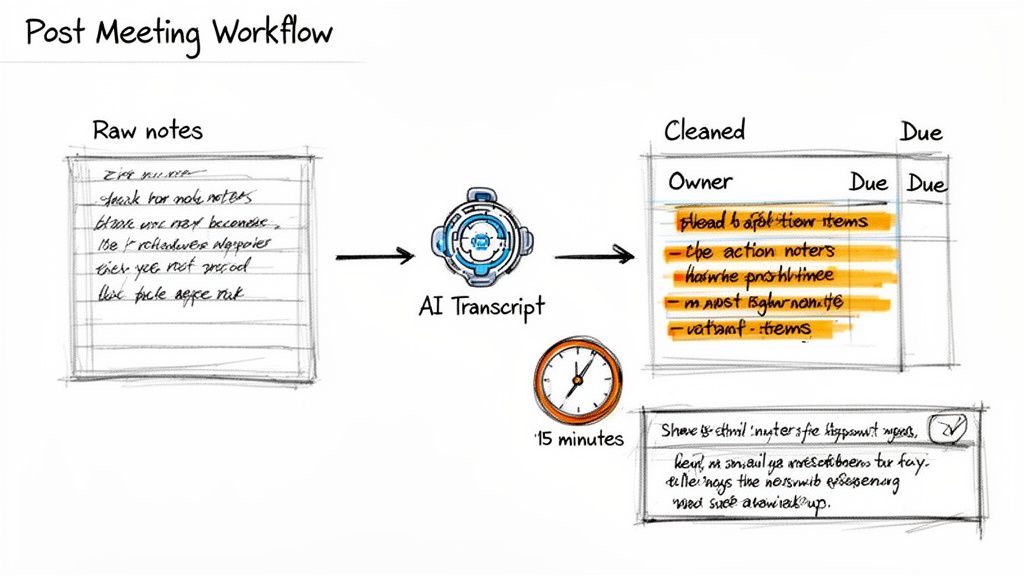
This final step is what separates notes that get results from notes that just take up space. The goal isn't to spend another hour wordsmithing a perfect transcript. It's about a focused, 15-minute blitz to clean up, clarify, and get the key outcomes into the right hands.
The 15-Minute Cleanup Workflow
As soon as the meeting wraps, block off 15 minutes on your calendar. Do it immediately, while the context and conversations are still fresh. This small time investment pays off massively in clarity and accountability. If you wait until tomorrow, the details will already be getting fuzzy.
First, give your raw notes a quick scan. You're hunting for the big three: key decisions, action items, and any lingering questions. Use bold text or highlights to make them pop.
This is where an AI transcription tool becomes your secret weapon. Cross-reference your own jotted notes with the full transcript to plug any holes. Did you miss the exact deadline someone committed to? Forget who volunteered for a follow-up? A quick Ctrl+F on the transcript gives you the objective truth in seconds.
Clarify and Assign Action Items
This is the most critical part of the cleanup. Vague tasks are where progress stalls and dies. Every single action item needs two things, no exceptions: a clear owner and a specific due date.
There's no room for ambiguity. "Someone will look into the Q3 budget" is a recipe for inaction. "David will send the final Q3 budget report to the leadership team by Friday, July 26th" is a real commitment.
Go through your list and make sure every task is assigned. If ownership is unclear, that’s your first follow-up. A quick Slack message asking, "Who's taking point on this?" saves a ton of confusion down the line. To make sure nothing falls through the cracks, it's a good idea to share task lists in Google Tasks and Gmail so everyone is aligned.
Your follow-up summary should be a tool for action, not an archive of conversation. Its primary job is to tell people what to do next.
Distribute and Store for the Future
Once your notes are clean and actionable, it's time to get them out there. Don't just email a document and hope for the best. A sharp, concise follow-up email is your best friend here.
Keep the email short and scannable, leading with the most important info first. A simple structure like this works every time:
- Subject: Recap & Actions from [Meeting Name] - [Date]
- Hi Team, Quick summary of our discussion today.
- Key Decisions Made:
- [Decision 1]
- [Decision 2]
- Action Items:
- [Task 1] - @Owner Name (Due: [Date])
- [Task 2] - @Owner Name (Due: [Date])
- Full notes are attached/linked here for reference.
This format respects everyone's time by putting the need-to-know info right at the top.
Finally, think about where these notes will live long-term. Don't let them get buried in an email thread or lost on a local drive. Store them in a central, searchable place—a shared team folder, a Notion database, or a Confluence page.
This simple habit turns your meeting notes from a one-off update into a valuable knowledge base. For more ideas on this, explore some best practices for knowledge management. When someone new joins the team or needs to get up to speed on a project's history, this searchable archive becomes an incredibly powerful resource.
Meeting Notes FAQ
Even with the best game plan, a few questions always pop up when you're getting the hang of taking great meeting notes. It's one thing to know the theory, another to put it into practice when the conversation is moving fast. Here are some quick answers to the most common hurdles.
The goal isn't just to write stuff down—it's to build a system that you can rely on. Let's clear up these common sticking points so you can turn good intentions into a solid habit.
What Is the Single Most Important Thing to Include in Meeting Notes
Hands down: decisions made and action items assigned. Everything else is just supporting context. And an action item is useless without two things: a specific owner and a hard deadline.
These two elements are what turn a chat into a productive meeting. Documenting decisions stops the team from having the same debate next week. Assigned action items are the engine that actually drives progress forward.
How Can I Take Good Notes and Still Participate
Ah, the classic dilemma. The answer is to stop trying to be a human stenographer. Instead, use a simple template to jot down only the absolute essentials—key decisions, your own thoughts, and action items as they’re assigned.
Let an AI transcription tool like Meowtxt handle the heavy lifting of recording the full conversation in the background. This frees you up to actually think, listen, and add your voice to the discussion. After the meeting, you can skim the transcript to fill in any important context you missed, giving you the best of both worlds without sacrificing your presence.
How Quickly Should I Send Out Meeting Notes
Aim to clean up and send out your notes within a few hours, and no later than the end of the workday. The details are still fresh in everyone's mind, making it way easier to get quick clarification on a task or confirm an ambiguous point.
A prompt summary signals that the outcomes are a priority and keeps the momentum going. Delaying it sends the opposite message—that the discussion wasn't important enough for immediate follow-up.
A focused 15-minute review and cleanup is all you should need. That small investment ensures everyone walks away aligned and ready to act, turning conversation into real results.
Ready to stop just taking notes and start creating actionable records? Meowtxt delivers accurate transcripts, speaker IDs, and AI-powered summaries in minutes. Free up your focus and let our tech capture every detail. Try it for free today.


